IGMP
This chapter shows you how to configure the Switch as a multicast router.
IGMP Overview
IP multicast is an IETF standard for distributing data to multiple recipients. The following figure shows a multicast session and the relationship between a multicast server, multicast routers (Rs) and multicast hosts (Hs). A multicast server transmits multicast packets and multicast routers (Rs) forward multicast packets to multicast hosts (Hs).
IP Multicast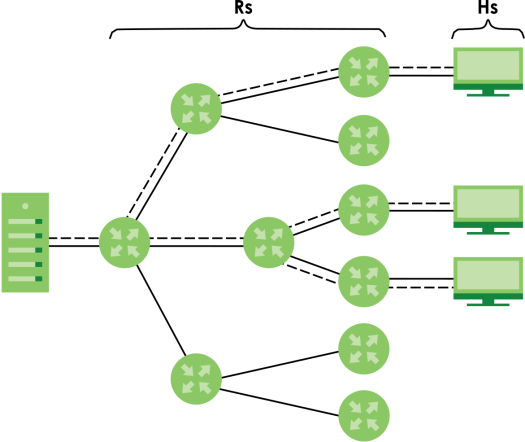
A host can decide to join or leave a multicast group at any time. A host can also be a member of more than one multicast group. Multicast groups are identified by IP addresses in the Class D range (224.0.0.0 to 239.255.255.255). A multicast server sends packets addressed to a particular multicast group (multicast IP address).
IGMP (Internet Group Management Protocol) is used by multicast hosts to indicate their multicast group membership to multicast routers. Multicast routers can also use IGMP to periodically check if multicast hosts still want to receive transmission from a multicast server. In other words, multicast routers check if any hosts on their network are still members of a specific multicast group.
The Switch supports IGMP version 1 (IGMP-v1), version 2 (IGMP-v2) and IGMP version 3 (IGMP-v3). Refer to RFC 1112, RFC 2236 and RFC 3376 for information on IGMP versions 1, 2 and 3 respectively. At start up, the Switch queries all directly connected networks to gather group membership. After that, the Switch periodically updates this information.
How IGMP Works
This section describes how IGMP works and the changes it has gone through from version 1 to version 3. IGMP version 1 defines how a multicast router checks to see if any multicast hosts are part of a multicast group. It checks for group membership by sending out an IGMP Query packet. Hosts that are members of a multicast group reply with an IGMP Report packet. This is also referred to as a join group request. The multicast router then keeps a list of all networks that have members of this multicast group and forwards multicast traffic to that network.
IGMP Version 1 Example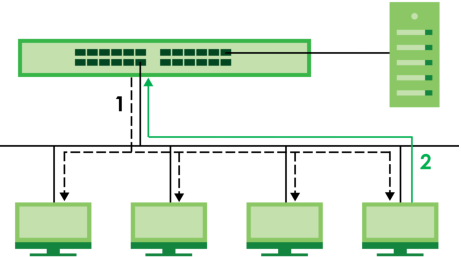
The main difference in IGMP version 2 is that it provides a mechanism for a multicast group member to notify a multicast router that it is leaving a multicast group. The multicast router then sends a group-specific IGMP query to check if there are any members remaining in that group. If the multicast router does not receive an IGMP report from any members, it stops sending multicast traffic to that group. This change helps shorten the leave convergence time, in other words, the amount of time that a multicast router believes that there are group members on a particular network. This in turn helps reduce the amount of multicast traffic going through the multicast router.
IGMP Version 2 Example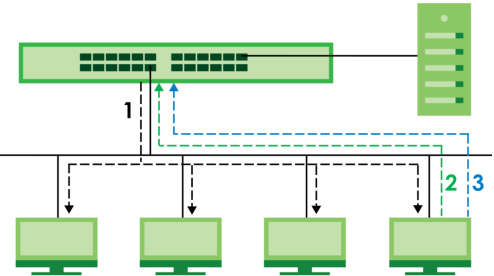
IGMP version 3 allows a multicast host to join a multicast group and specify from which source (multicast server) it wants to receive multicast packets. Alternatively, a multicast host can specify from which multicast servers it does not want to receive multicast packets. In the following figure multicast server X (IP address 10.1.1.1) and multicast server Z (IP address 13.2.2.2) both send multicast traffic to the same multicast group identified by the multicast IP address 225.1.1.1. In IGMP version 3 multicast host A can join multicast group 225.1.1.1 and specify that it only wants to receive multicast packets from server X.
IGMP Version 3 Example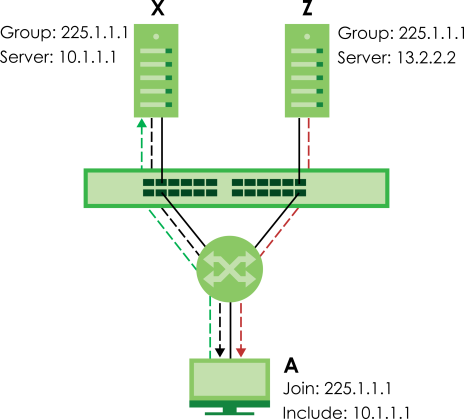
Port-based IGMP
The Switch sends IGMP Query packets to all ports. The Switch then listens for IGMP Report packets, and it records which port the messages came from. It then delivers multicast traffic to only those ports from which it received a request to join a multicast group.
Configuring IGMP
Click NETWORKING > IGMP > IGMP in the navigation panel to display the screen as shown next. Each entry in the table is automatically created when you configure a new IP domain in the SYSTEM > IP Setup > IP Setup screen.
NETWORKING > IGMP > IGMP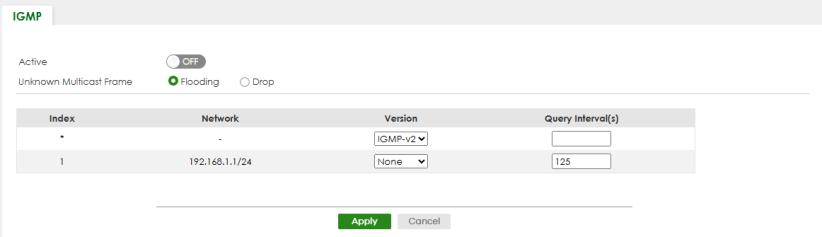
The following table describes the labels in this screen.
label | description |
|---|---|
Active | Enable the switch button to enable IGMP on the Switch.  You cannot enable both IGMP snooping and IGMP at the same time. |
Unknown Multicast Frame | Specify the action to perform when the Switch receives an unknown multicast frame. Unknown multicast frames are addressed to multicast groups for which the Switch has not recorded any group members. Select Drop to discard the frames. Select Flooding to send the frames to all ports. |
Index | This field displays an index number of an entry. |
Network | This field displays the IP domain configured on the Switch. |
Version | Select an IGMP version from the drop-down list box. The choices are IGMP-v1, IGMP-v2, IGMP-v3 and None. Generally, if you want to enable IGMP on the Switch, you should choose IGMP-v3 as it is compatible with older versions. Choose an earlier version of IGMP (IGMP-v2 or IGMP-v1) if the multicast hosts on your network can not recognize IGMP version 3 or version 2 Query messages. |
Query Interval(s) | Enter the period in seconds (1 to 65535) between each IGMP query. The Switch sends membership query messages to discover which multicast groups have members on the attached networks of the multicast router after every query interval. The default value is 125 seconds. |
Apply | Click Apply to save your changes to the Switch’s run-time memory. The Switch loses these changes if it is turned off or loses power, so use the Save link on the top navigation panel to save your changes to the non-volatile memory when you are done configuring. |
Cancel | Click Cancel to begin configuring this screen afresh. |
DVMRP Configuration Error Messages
You must have IGMP enabled when you enable DVMRP; otherwise you see the screen as in the next figure.
DVMRP: IGMP Not Set Error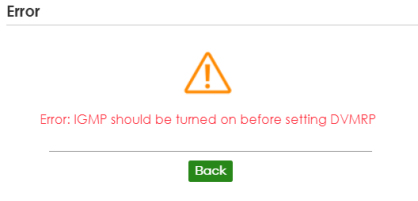
When you disable IGMP, but DVMRP is still active you also see another warning screen.
DVMRP: Unable to Disable IGMP Error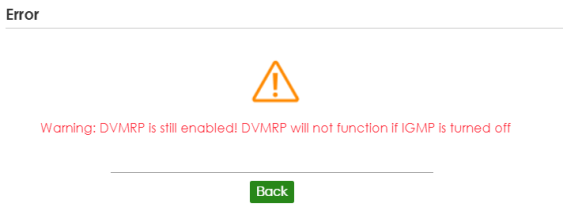
Each IP routing domain DVMRP configuration must be in a different VLAN group; otherwise you see the following screen.
DVMRP: Duplicate VID Error Message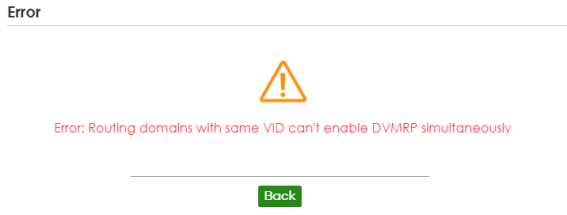
Default DVMRP Timer Values
The following are some default DVMRP timer values.
DVMRP Field | Default Value |
|---|---|
Probe interval | 10 sec |
Report interval | 35 sec |
Route expiration time | 140 sec |
Prune lifetime | Variable (less than 2 hours) |
Prune retransmission time | 3 sec with exponential back off |
Graft retransmission time | 5 sec with exponential back off |