Policy Routing
This chapter shows you how to configure policy routing rules.
Policy Route Overview
Traditionally, routing is based on the destination address only and the Switch takes the shortest path to forward a packet. Policy routing provides a mechanism to override the default routing behavior and alter the packet forwarding based on the policy defined by the network administrator. Policy-based routing is applied to incoming packets prior to the normal routing.
Individual routing policies are used as part of the overall policy routing process. A routing policy defines the action to take when a packet meets the criteria in a specified classifier. The action is taken only when all the criteria are met.
Benefits
• Source-Based Routing – Network administrators can use policy-based routing to direct traffic from different users through different connections.
• Cost Savings – Policy routing allows organizations to distribute interactive traffic on high-bandwidth, high-cost paths while using low-cost paths for batch traffic.
• Load Sharing – Network administrators can use policy routing to distribute traffic among multiple paths.
Configuring Policy Routing Profile
Click NETWORKING > Policy Routing > Policy Route Profile in the navigation panel to display the screen as shown. Use this screen to view and configure policy routing profiles, which can consist of multiple policy routing rules.
NETWORKING > Policy Routing > Policy Route Profile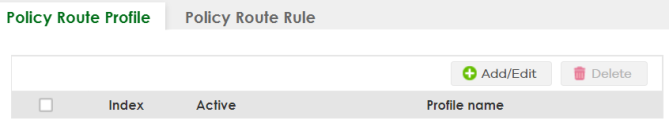
The following table describes the labels in this screen.
LABEL | DESCRIPTION |
|---|---|
Select an entry’s checkbox to select a specific entry. Otherwise, select the checkbox in the table heading row to select all entries. | |
Index | This field displays the index number of the policy routing profile. |
Active | This field displays whether the policy routing profile is activated or not. |
Profile Name | This field displays the descriptive name for this profile. This is for identification purposes only. |
Add/Edit | Click Add/Edit to add a new entry or edit a selected one. |
Delete | Click Delete to remove the selected entries. |
Add/Edit a Policy Routing Profile
Click Add/Edit, or select an entry and click Add/Edit in the NETWORKING > Policy Routing > Policy Route Profile screen to display this screen. Use this screen to add/edit a policy routing profile, which can consist of multiple policy routing rules.
NETWORKING > Policy Routing > Policy Route Profile > Add/Edit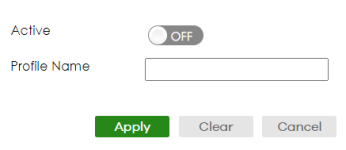
The following table describes the labels in this screen.
LABEL | DESCRIPTION |
|---|---|
Active | This field allows you to activate or deactivate this policy routing profile and rules in the profile. |
Profile Name | Enter a descriptive name (up to 32 printable ASCII characters except [ ? ], [ | ], [ ' ], [ " ] or [ , ]) for identification purposes. Spaces are allowed. |
Apply | Click Apply to save your changes to the Switch’s run-time memory. The Switch loses these changes if it is turned off or loses power, so use the Save link on the top navigation panel to save your changes to the non-volatile memory when you are done configuring. |
Clear | Click Clear to clear the fields to the factory defaults. |
Cancel | Click Cancel to not save the configuration you make and return to the last screen. |
Policy Routing Rule Configuration
Use this screen to view and configure a policy route to override the default (shortest path) routing behavior and forward packets based on the classifier and action you specify. A policy route rule defines the matching classifier and the action to take when a packet meets the criteria in the classifier. The action is taken only when all the criteria are met. Policy-based routing is applied to incoming packets on a per interface basis before normal routing. The Switch does not perform normal routing on packets that match any of the policy routes.
Click NETWORKING > Policy Routing > Policy Route Rule screen to display the screen as shown.
 The policy route profiles displayed in this screen are the profiles you created in the NETWORKING > Policy Routing > Policy Route Profile screen.
NETWORKING > Policy Routing > Policy Route Rule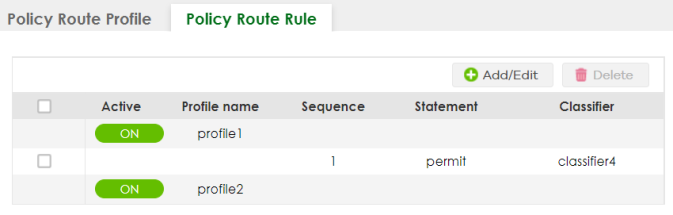
The following table describes the labels in this screen.
label | Description |
|---|---|
Active | This field displays whether the policy route profile is enabled or not. |
Profile Name | This field displays the name of the policy route profile with which the rule is associated. |
Sequence | This field displays the rule index number that you configure in the Sequence field. Click an index number to change the rule’s Statement. |
Statement | This field displays permit when the rule action is activated and deny when is it deactivated. |
Classifier | This field displays the name of the classifier to which this policy applies. |
Select an entry’s checkbox to select a specific entry. Otherwise, select the checkbox in the table heading row to select all entries. | |
Add/Edit | Click Add/Edit to add a new entry or edit a selected one. |
Delete | Click Delete to remove the selected entries. |
Add/Edit a Policy Routing Rule
Click Add/Edit in the NETWORKING > Policy Routing > Policy Route Rule screen to display the screen. Use this screen to add a policy routing rule for the profile you created in the NETWORKING > Policy Routing > Policy Route Profile screen.
You must first configure a layer-3 classifier in the SECURITY > ACL > Classifier screen and a policy routing profile in the NETWORKING > Policy Routing > Policy Route Profile screen.NETWORKING > Policy Routing > Policy Route Rule > Add/Edit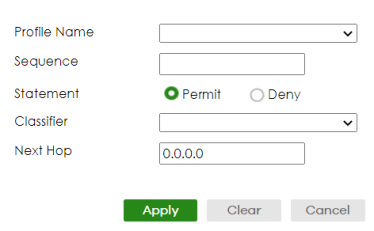
The following table describes the labels in this screen.
label | Description |
|---|---|
Profile Name | This field displays the policy routing profiles you configure in the NETWORKING > Policy Routing > Policy Route Profile screen. Select a profile for which you want to configure a policy routing rule. |
Sequence | Enter the rule number from 1 to 64. The ordering of your rules is important as rules are applied in turn. You can not specify a number already in use by another rule. |
Statement | Select Permit to forward traffic that matches this rule to the gateway specified in the rule. Select Deny to disable the rule action and forward traffic that matches this rule according to the routing table on the Switch. |
Classifier | This field displays the available active classifiers you configure in the SECURITY > ACL > Classifier screen, which are not used by any policy rule or policy routing rule. Select a classifier to which this policy routing rule applies. |
Next Hop | Enter the IP address of the gateway. The gateway is an immediate neighbor of your Switch that will forward the packet to the destination. |
Apply | Click Apply to save your changes to the Switch’s run-time memory. The Switch loses these changes if it is turned off or loses power, so use the Save link on the top navigation panel to save your changes to the non-volatile memory when you are done configuring. |
Clear | Click Clear to clear the fields to the factory defaults. |
Cancel | Click Cancel to not save the configuration you make and return to the last screen. |