Router Setup
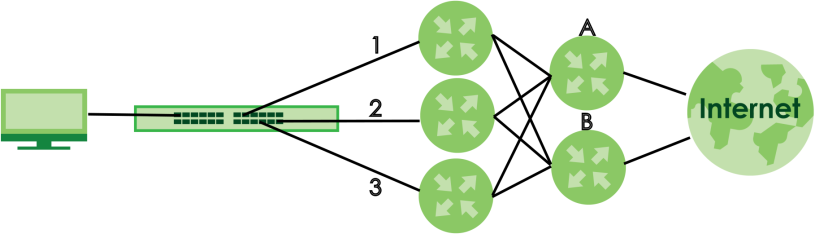
The Switch learns the next-hops using ARP and determines routing paths for a destination. The Switch supports Equal-Cost MultiPath (ECMP) to forward packets destined to the same device (A for example) through different routing paths (1, 2 and 3) of equal path cost. This allows you to balance or share traffic loads between multiple routing paths when the Switch is connected to more than one next-hop. ECMP works with static routes or a routing protocol, such as OSPF. With ECMP, packets are routed through the paths of equal cost according to the hash algorithm output.
Configuring Router Setup
Click NETWORKING > Router Setup > Router Setup in the navigation panel to display the screen as shown next.
NETWORKING > Router Setup > Router Setup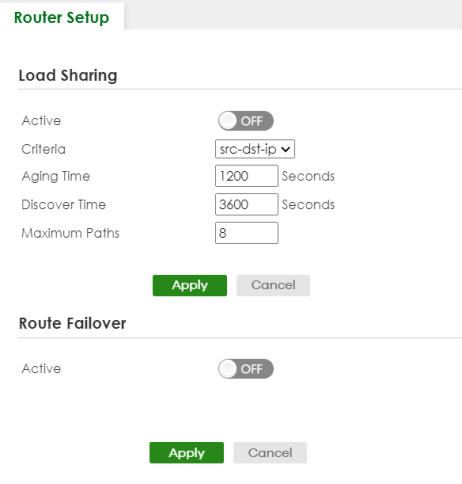
The following table describes the labels in this screen.
label | description |
|---|---|
Load Sharing Use this section to enable and configure Load Sharing on the Switch. | |
Active | Enable the switch button to enable Equal-Cost MultiPath (ECMP) routing on the Switch. |
Criteria | Select the criteria the Switch uses to determine the routing path for a packet. Select src-ip to have the Switch use a hash algorithm to convert a packet’s source IP address into a hash value which acts as an index to a route path. Select src-dst-ip to have the Switch use a hash algorithm to convert a packet’s source and destination IP addresses into a hash value which acts as an index to a route path. |
Aging Time | Specify the time interval (from 0 to 86400 in increments of 10) in seconds at which the Switch sends an ARP request to update a resolved next-hop’s MAC address. |
Discover Time | Specify the time interval (from 0 to 86400 in increments of 10) in seconds at which the Switch sends an ARP request to update an unresolved next-hop’s MAC address. |
Maximum Paths | Set the maximum number of paths for one ECMP (Equal-Cost MultiPath) route. The maximum number varies by Switch. A smaller number of maximum-paths means more ECMP routes are allowed and a larger number of maximum-paths means fewer ECMP routes are allowed. The number of paths for a static route for ECMP cannot be bigger than the maximum-paths value configured here. Throughput may be influenced while configuring ECMP maximum-paths. |
Apply | Click Apply to save your changes to the Switch’s run-time memory. The Switch loses these changes if it is turned off or loses power, so use the Save link on the top navigation panel to save your changes to the non-volatile memory when you are done configuring. |
Cancel | Click Cancel to begin configuring this screen afresh. |
Route Failover The Switch supports Route Failover for static routes. You can set up more than one link with the same destination address in the NETWORKING > Static Routing > IPv4 Static Route screen. The Switch sends ping requests to the link’s next hop to determine if a route link has a reachable next hop. The Switch will check if the links have a reachable next hop, then sort these links by their metrics (the number of hops to the final destination). The link with the lowest metric will be the primary link. The link with the next lowest metric will be the secondary link. If Route Failover is enabled, when a primary route link is down, the Switch will use the secondary link. The secondary link will be set to down when the primary link is valid again. There will only be one active link at a time. | |
Active | Enable the switch button to enable Route Failover on the Switch. |