Private VLAN
Private VLAN Overview
Use private VLAN if you want you to block traffic between ports in the same VLAN. Community and Isolated VLANs are secondary private VLANs that must be associated with a Primary private VLAN.
• Primary: Ports in a Primary VLAN are promiscuous and they can communicate with all promiscuous ports in the same primary VLAN, and all ports in associated community and isolated VLANs. They cannot communicate with ports in different primary VLANs.
• Community: Ports in a Community VLAN can communicate with promiscuous ports in an associated Primary VLAN and other community ports in the same Community VLAN. They cannot communicate with ports in Isolated VLANs, non-associated Primary VLAN promiscuous ports nor community ports in different Community VLANs.
• Isolated: Ports in an Isolated VLAN can communicate with promiscuous ports in an associated Primary VLAN only. They cannot communicate with other isolated ports in the same Isolated VLAN, non-associated Primary VLAN promiscuous ports nor any community ports.
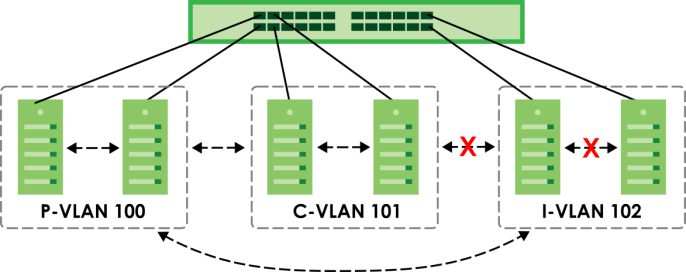
Label | description |
|---|---|
P-VLAN 100 | Primary private VLAN |
C-VLAN 101 | Community private VLAN |
I-VLAN 102 | Isolated private VLAN |
Tagged Private VLANs can span switches but trunking ports must be VLAN-trunking ports – see SWITCHING > VLAN > VLAN Setup > VLAN Port Setup.
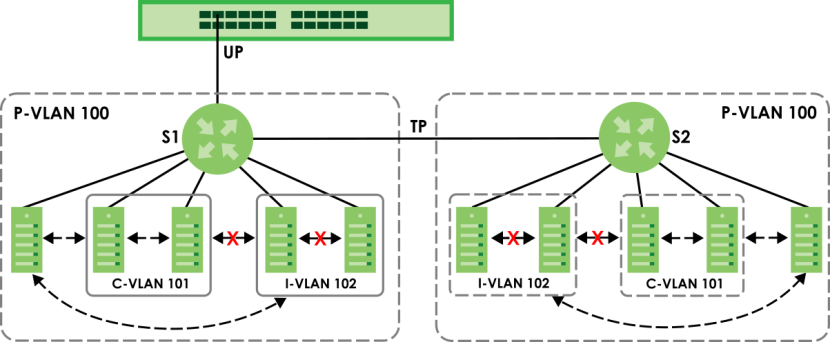
Label | description |
|---|---|
UP | Uplink promiscuous port |
TP | VLAN-trunking ports |
S1, S2 | Switch 1, Switch 2 |
P-VLAN 100 | Primary private VLAN with VLAN ID tag of 100 |
C-VLAN 101 | Community private VLAN with VLAN ID tag of 101 |
I-VLAN 102 | Isolated private VLAN with VLAN ID tag of 102 |
This is the communication process if primary VLAN P-VLAN 100 is associated with community VLAN C-VLAN 101 and isolated VLAN I-VLAN 102.
• Promiscuous ports in P-VLAN 100 can communicate with all ports in P-VLAN 100 including community ports in C-VLAN 101 and isolated ports in I-VLAN 102.
• Community ports in C-VLAN 101 can communicate with promiscuous ports in P-VLAN 100 and other community ports in C-VLAN 101. They cannot communicate with isolated ports in I-VLAN 102.
• Isolated ports can communicate with promiscuous ports in P-VLAN 100. They cannot communicate with other isolated ports in I-VLAN 102 nor community ports in C-VLAN 101.
 Isolation in SWITCHING > VLAN > VLAN Setup > VLAN Port Setup has a higher priority than private VLAN settings, so promiscuous ports with Isolation in SWITCHING > VLAN > VLAN Setup > VLAN Port Setup enabled will not be able to communicate with each other.
Private VLAN Configuration
You must go to the SWITCHING > VLAN > VLAN Setup > Static VLAN screen first to create VLAN IDs for Primary, Isolated or Community VLANs.
Click SWITCHING > Private VLAN to display the following screen.
SWITCHING > Private VLAN > Private VLAN (Standalone Mode)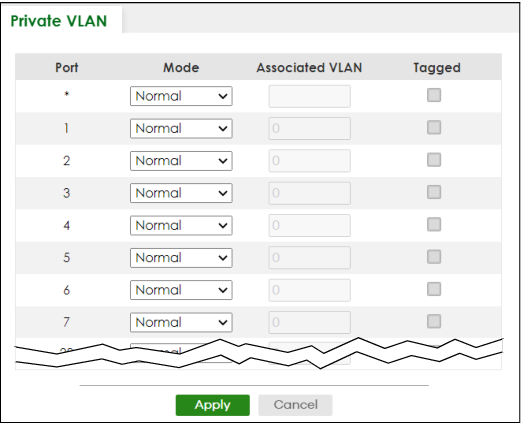
SWITCHING > Private VLAN > Private VLAN (Stacking Mode)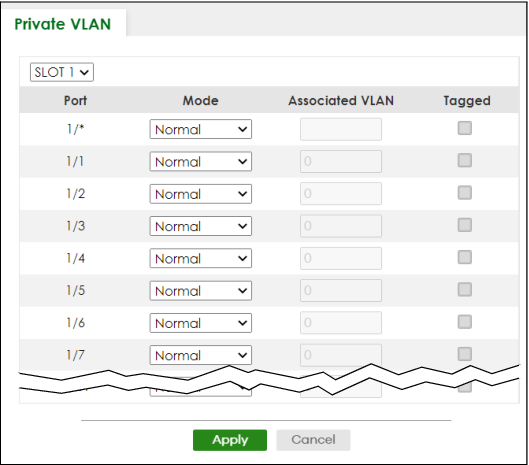
The following table describes the labels in this screen.
label | description |
|---|---|
SLOT | This field appears only in Stacking mode. Click the drop-down list to choose the slot number of the Switch in a stack. |
Port | This field displays the port number. In Stacking mode, the first number represents the slot ID and the second is the port number. Please note that the default stacking ports (the last four ports of your Switch) cannot be configured. They are reserved for stacking only. |
* | Settings in this row apply to all ports. Use this row only if you want to make some settings the same for all ports. Use this row first to set the common settings and then make adjustments on a port-by-port basis. Changes in this row are copied to all the ports as soon as you make them. |
Mode | This is the type of VLAN mapped to this port. • Normal: These are ports in a static VLAN. This is not a private VLAN. • Promiscuous: Ports in a Primary VLAN are Promiscuous. They can communicate with all ports in the Primary VLAN and associated Community and Isolated VLANs. They cannot communicate with Promiscuous ports in different primary VLANs. • Isolated: Ports in an Isolated VLAN can communicate with Promiscuous ports in an associated Primary VLAN only. They cannot communicate with other Isolated ports in the same Isolated VLAN, non-associated Primary VLAN Promiscuous ports nor any Community ports. • Community: Ports in a Community VLAN can communicate with Promiscuous ports in an associated Primary VLAN and other community ports in the same Community VLAN. They cannot communicate with ports in an Isolated VLAN, non-associated Primary VLAN Promiscuous ports nor Community ports in different Community VLANs. |
Associated VLAN | Enter the VLAN ID of a previously created VLAN here. The VLAN ID and Mode selected here must be the same as the VLAN ID and VLAN Type created in SWITCHING > VLAN > VLAN Setup > Static VLAN. |
Tagged | A VLAN ID tag identifies VLAN membership of a frame across switches. Select this if the VLAN includes ports on multiple switches. The Switch forwards tagged frames through this port; it adds the PVID to untagged frames before sending them out. Clear this if the VLAN includes ports on this Switch only. The Switch forwards untagged frames through this port; it removes the VLAN ID from tagged frames before sending them out. |
Apply | Click Apply to save your changes to the Switch’s run-time memory. The Switch loses these changes if it is turned off or loses power, so use the Save link on the top navigation panel to save your changes to the non-volatile memory when you are done configuring. |
Cancel | Click Cancel to begin configuring this screen afresh. |