MSP Settings
Use this screen to change your general MSP settings, such as the MSP name and enable access from Zyxel CSO (customer support). Click MSP > MSP cross-org manage > MSP settings to access this screen.
MSP > MSP cross-org manage > MSP settings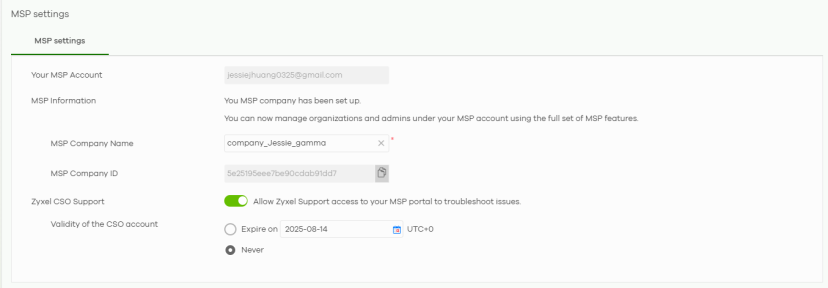
The following table describes the labels in this screen.
Label | Description |
|---|---|
Your MSP account | This shows the email address of the MSP account’s administrator, which is used to log into the NCC. This field is read-only. The MSP information field confirms that your MSP account has been set up and is ready for use. |
MSP company name | By default, this shows the email address of the MSP account’s administrator. Enter a descriptive name for the MSP. Enter up to 100 characters in this field including special characters inside the square quotes [~!@#$%^&*()_+{}|:”<>?–=[]\;’,./]. |
MSP company ID | This shows the 24-digit MSP ID generated automatically by NCC and is not editable. You can copy the ID by clicking the copy icon beside the ID. |
Zyxel CSO support | Click the switch to the right to allow the Zyxel customer support account to access your MSP settings, so that they can help check your configurations and log messages for troubleshooting. |
Validity of the CSO support | When you enable Zyxel CSO support, specify how long Zyxel customer support access is valid. Choices are: • Never: select this if Zyxel customer support access never expires. • Expire on: select this to specify the date the Zyxel customer support account can no longer access the MSP settings. Then click Save. |