Configure a Unique SSID Name for Each AP (for Nebula Access Points only)
Use programmable SSID to create more than 8 WiFi networks for a site, each with unique SSID names and passwords.
For example, you might want to allow schools or hotels to have a unique SSID for each room.
To use programmable SSID:
1 Go to Site-wide > Configure > Access points > SSID settings. Click the Advanced mode switch to the right.
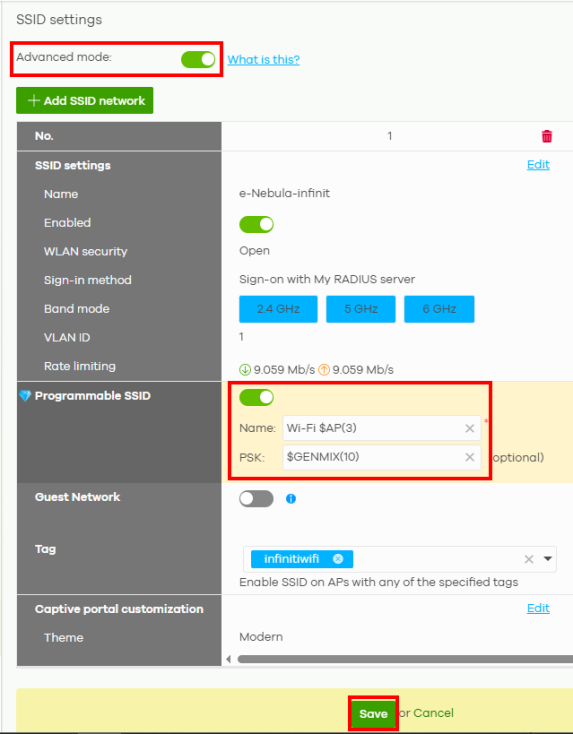
2 Click the switch in Programmable SSID to the right to have each Nebula Device that uses this SSID generate a unique SSID Name and pre-shared key (PSK) based on the Nebula Device’s model name, serial number, or MAC address.
3 Enter a programmable SSID Name in the format PREFIX+VALUE(X). This name overrides the default SSID Name (e-Nebula-infinit). Enter an optional programmable PSK in the format GENTYPE(Y). See Site-wide > Configure > Access points > SSID settings on the correct format when applying programmable SSID on the Name and PSK.
• PREFIX: Optional prefix to add to the SSID, for example “FreeWiFi_”. To use “$” in the SSID name, enter “$$”
• VALUE: Specify a Nebula Device value to use to generate the SSID name. Use one of the following:
$AP = Nebula Device device name.
$MAC = Nebula Device MAC address.
$SN = Nebula Device serial number.
$AP = Nebula Device device name.
$MAC = Nebula Device MAC address.
$SN = Nebula Device serial number.
• X: Specify how many characters of the Nebula Device value to use in the SSID. A positive number means the first X characters, and a negative number means the last X characters.
• GENTYPE: Specify how the Nebula Device will generate a random PSK.
$GENMIX = The Nebula Device generates a mix of random letters and numbers.
$GENNUM = The Nebula Device generates a mix of random numbers only.
$AP = Nebula Device device name.
$MAC = Nebula Device MAC address.
$SN = Nebula Device serial number.
Y = Specify the length of the PSD. The minimum length is 8.
$GENMIX = The Nebula Device generates a mix of random letters and numbers.
$GENNUM = The Nebula Device generates a mix of random numbers only.
$AP = Nebula Device device name.
$MAC = Nebula Device MAC address.
$SN = Nebula Device serial number.
Y = Specify the length of the PSD. The minimum length is 8.
Example 1
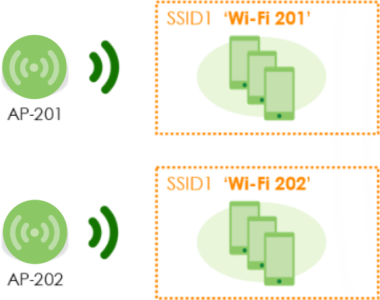
You want to have the SSID name begin with 'Wi-Fi' and the first 3 characters of the Nebula Device name. Enter ‘Wi-Fi $AP(3)’ in Name.
Nebula Device name | model | mac address | serial number |
|---|---|---|---|
201 | NWA1123-ACv2 | 2D:85:1E:XX:XX:01 | S273ZXXXXXX01 |
202 | NAP102 | 69:9C:G4:XX:XX:02 | S273ZXXXXXX02 |

Example 2
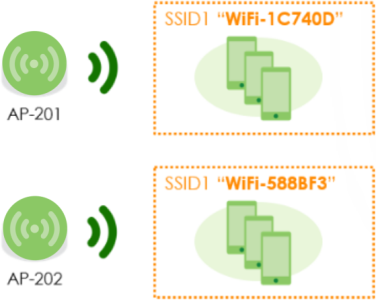
You want the SSID name to begin with 'WiFi–' and the first 6 characters of the Nebula Device MAC address. Enter ‘WiFi–$MAC(6)’ in Name.
Nebula Device name | model | mac address | serial number |
|---|---|---|---|
AP-201 | NWA1123-ACv2 | 1C:74:0D:XX:XX:01 | S273ZXXXXXX01 |
AP-202 | NAP102 | 58:8B:F3:XX:XX:02 | S273ZXXXXXX02 |

Example 3
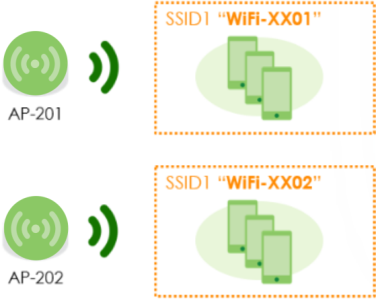
You want the SSID name to begin with 'WiFi–' and the last 4 characters of the Nebula Device serial number. Enter ‘WiFi–$SN(–4)’ in Name.
Nebula Device name | model | mac address | serial number |
|---|---|---|---|
AP-201 | NWA1123-ACv2 | 2D:85:1E:XX:XX:01 | S273ZXXXXXX01 |
AP-202 | NAP102 | 69:9C:G4:XX:XX:02 | S273ZXXXXXX02 |

Example 4
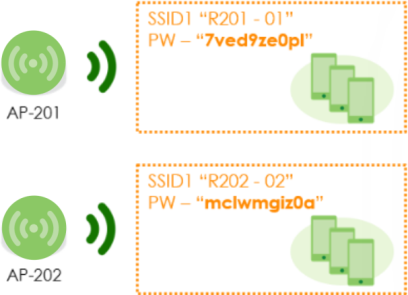
You want the SSID name to begin with 'R' and a combination of the last 3 characters of the Nebula Device name and the last 2 characters of the Nebula Device serial number. Enter ‘R$AP(–3)–$SN(–2)’ in Name.
You want to have a PSK of 10-character random password consisting of lowercase letters and numbers. Enter ‘$GENMIX(10)’ in PSK.
You want to have a PSK of 10-character random password consisting of lowercase letters and numbers. Enter ‘$GENMIX(10)’ in PSK.
Nebula Device name | model | mac address | serial number |
|---|---|---|---|
AP-201 | NWA1123-ACv2 | 2D:85:1E:XX:XX:01 | S273ZXXXXXX01 |
AP-202 | NAP102 | 69:9C:G4:XX:XX:02 | S273ZXXXXXX02 |

4 Then, click Save.