Change the WiFi Band Mode
If your WiFi network is slow, change the WiFi band mode. Choose 6 GHz if the connected WiFi clients support it. Choose 5G for WiFi clients within range that require higher speeds such as video streaming.
To change the WiFi network band mode:
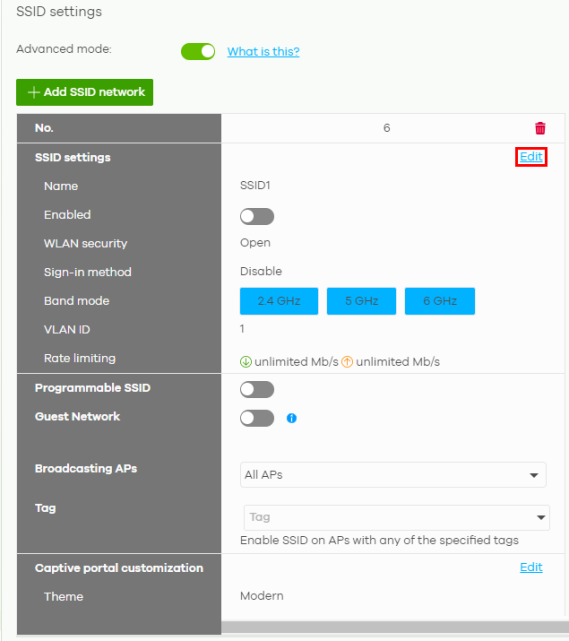
1 Go to the Site-wide > Configure > Security router / Access points > SSID settings tab and click Edit.
2 In the Site-wide > Configure > Access points > SSID advanced settings: Advanced settings: Band mode; select to have the SSID use a different band (2.4 GHZ band, 5 GHz band, or 6 GHz band).
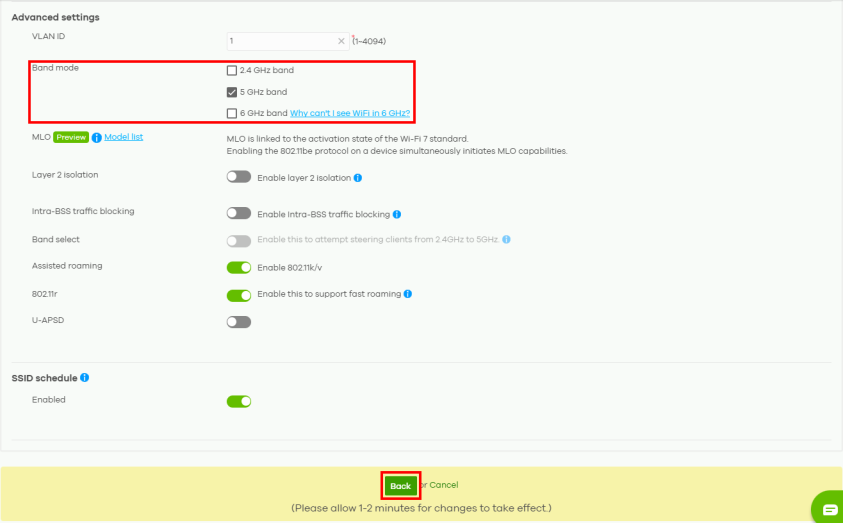
3 Click Back to proceed.