Create a DPPSK Key Using the DPPSK API
This tutorial shows you how to create the DPPSK key through the NCC DPPSK API (Application Programming Interface).
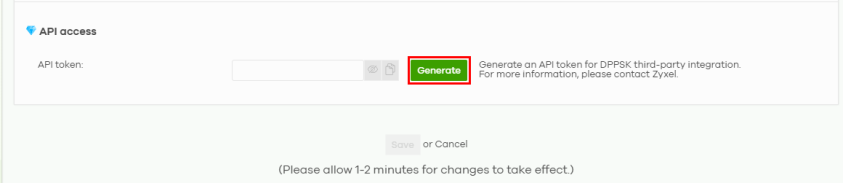
1 Go to Site-wide > Configure > Site settings. Navigate to API access and then click Generate to create the API token for DPPSK. See Site Settings for more information on API token.
2 Use the following parameters to create a DPPSK key through API.
command | url | description | example response |
|---|---|---|---|
PUT | /dppsk/key | Create/modify a PPSK | { "status": 200, "message:": "Ok" } |
The API endpoint is https://api.nebula.zyxel.com/v1/vendor/wiflex/.
The header (or API token) is:
header (api token) | |
|---|---|
X-ZyxelNebula-API-Key | XXXXXXXXXXXXXXXXX (Replace your API token here) |
The following is an example output.
3 Create the DPPSK entry with the key ‘CreateDppskKey’.
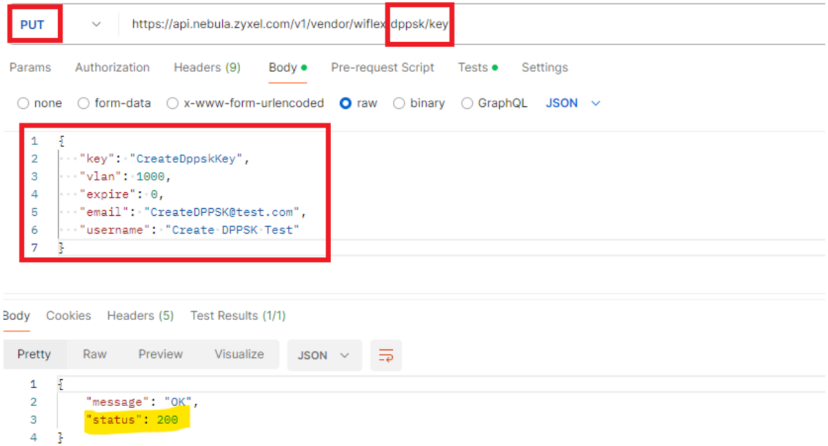
4 Go to Site-wide > Configure > Cloud authentication > DPPSK to view the new DPPSK entry.
