Config Management
The config management screen allows you to copy settings or a site from one organization to another. You can also move Nebula Devices with its settings to another organization.
Config management setting sync
Config management copies the following items from one organization to another organization:
• Organization-wide settings
• Administrators
• Cloud Authentication accounts (Users and MAC)
• Configuration templates
Your account must have owner or organization-full privileges in both source and destination organizations. When copying organization-wide settings, the following settings will not be overwritten if they are already configured in the destination organization:
• Organization-wide > Organization-wide manage > Organization settings: Country
• Organization-wide > Organization-wide manage > Organization settings: Login IP ranges
• Administrators privileges (when source and destination organizations have the same admin account)
• Cloud Authentication account privileges (when source and destination organizations have the same Cloud Authentication account)
When copying configuration templates:
• No sites are bound to the new template site.
• If the destination organization has a template with the same name, then the new template will have a number appended to the end of its name.
Config Management Site Clone
Site clone copies a site and all of its settings from one organization to another. Your account must have owner or organization-full privileges in both source and destination organizations.
If the destination organization has a site with the same name, then the new site will have a number appended to the end of its name.
The following table describes the Nebula Device (Access Point, Switch, Security Firewall) during site clone.
Nebula Device | site clone | move Nebula Device to cloned site – enabled | keep management/wan interface – enabled |
|---|---|---|---|
Access Point (AP) | When enabled: • AP site-wide configuration is cloned • Individual AP configuration is NOT cloned (for example, radio settings) | When enabled: AP site-wide configuration and individual AP configuration are cloned (for example, radio settings) | When enabled: AP site-wide configuration and individual AP configuration are cloned (for example, radio settings) |
Switch | When enabled: • Switch site-wide configuration is cloned • Individual Switch configuration is NOT cloned (for example, IGMP) • Switch port configuration is NOT cloned | When enabled: • Switch site-wide configuration is cloned • Individual Switch configuration is cloned (for example, IGMP) • Switch port configuration is cloned | When enabled: • Switch site-wide configuration is cloned • Individual Switch configuration is cloned (for example, IGMP) • Switch port configuration is cloned |
Security Firewall | When enabled, the site-to-site VPN settings are reset. | When enabled, the site-to-site VPN settings are reset. | When enabled, the site-to-site VPN settings are reset. |
Config Management Screen
Use this screen to configure cross-organization synchronization and cross site clones.
MSP > MSP cross-org manage > Config management 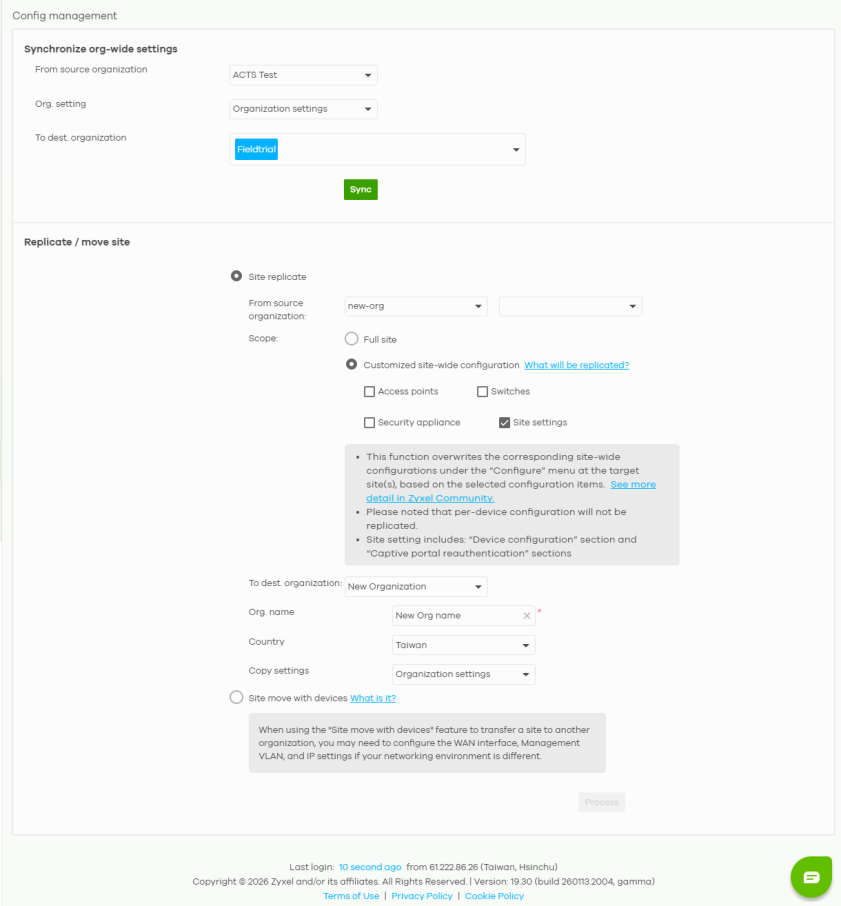
The following table describes the labels in this screen.
Label | Description |
|---|---|
Synchronize org-wide settings | |
From source organization | Select the organization to copy settings from. |
Org. setting | Select the settings that you want to copy from the source to the destination organization. Select All org-wide settings to copy everything. |
To dest. organization | Select the organization to copy settings to. |
Sync | Click this to copy the selected settings from the source to the destination organization. |
Replicate / move sites | |
Site replicate | Select this to allow the site settings to be copied to the destination organization and any future changes applied to the source organization. The following site-wide settings will be replicated and cannot be reversed: • All site-wide settings, including the site settings and alert settings • Device-related settings, for example, AP & port settings, SSID settings, Switch settings, Port profiles, Security Appliance settings including the VPN-related settings.  The Nebula Device specific settings will not be replicated (for example, Nebula Device name, Switch port name, and AP Role. The Nebula Device specific settings will not be replicated (for example, Nebula Device name, Switch port name, and AP Role. |
From source organization | Select the organization to copy settings from. Then select one or more sites. Select All sites to copy all sites from the source to the destination organization. Select Move site devices to cloned site in destination organization to include the Nebula Devices. Enable Keep Management/WAN interface to copy the WAN connection settings for the Nebula Devices to the destination organization. |
Scope | Full site – Include all the NCC site-wide configuration from which you want to replicate its site configuration to other sites. Customized site-wide configuration – Select the Nebula Device type to be included in the site from which you want to replicate its site configuration to other sites. |
To dest. organization | Select the organization to copy the selected sites to. |
Org. name | This field will appear when you select New Organization in the To dest. organization field. Enter a descriptive name, 1 to 64 characters including the following characters inside the square brackets [0–9 a–z A–Z `~!@#$%&*(_+-={}|[];'"./<> ?)]. |
Country | This field will appear when you select New Organization in the To dest. organization field. Select where the organization is located. |
Copy settings | This field will appear when you select New Organization in the To dest. organization field. Specify whether All org-wide settings, Organization settings, Administrators, Cloud authentication, or Configuration template settings of an organization will be propagated to other organizations. |
Site move with devices | Select this to include the Nebula Devices to the destination organization. You may need to configure the WAN interface, management VLAN, and IPv4 settings when your networking environment is different. |
From source organization | Select the organization to copy settings from. Then select one or more sites. Select All sites to copy all sites from the source to the destination organization. Select Copies settings for summary and IPTV reports, such as email recipients, custom logos, and more. to sync these information with the source site email recipients. |
To dest. organization | Select the organization to copy the selected sites to. |
Process | Click this to copy the selected sites including the Nebula Devices from the source to the destination organization. |