Transfer Nebula Devices to Another Organization
A Nebula Device assigned to an organization can be transferred to a different organization. Follow the guidelines below when transferring Nebula Devices:
• The organizations must have the same owner.
• Device HA (High Availability) ensures that a backup Security Firewall automatically takes over if the master Security Firewall fails. If the Nebula Device you are transferring is a Security Firewall with Device HA configured, a warning message will appear. If you decide to continue and click Ok, both Security Firewalls will restore to its factory-default settings to prevent misconfigurations in NCC. You need to re-install the Device HA. See the Security Firewall’s user’s guide for more information on Device HA.
To select from the Nebula Device(s) shown on the screen and assign it to another organization, do the following:
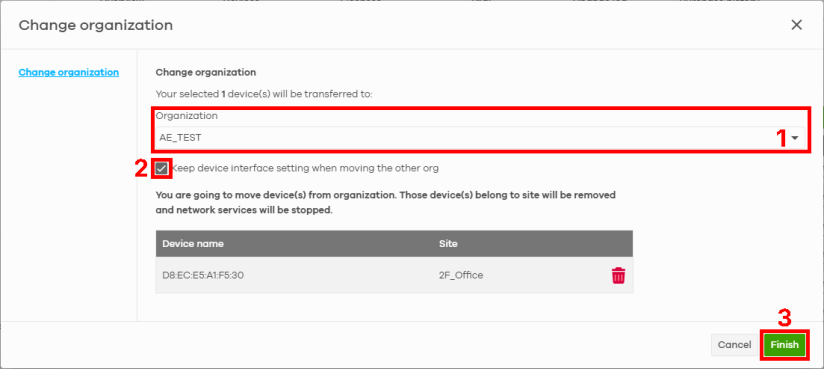
1 Go to the Organization-wide > License & inventory > Devices screen.
2 Select the Nebula Device you want to transfer. Click Actions, and then click Change organization.
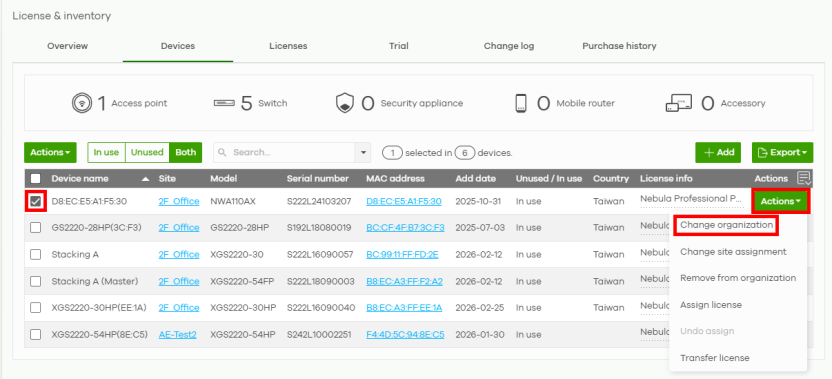
3 On the Change organization screen, select the organization to assign the Nebula Device from the Organization drop-down list (1).
 Select Keep device interface setting when moving to the other org to retain the WAN interface setting (2).
 4 Click Finish (3).