Change the Nebula Device Name
This tutorial teaches you how to:
• Change Nebula Device name in the Site-wide > Devices screen (for example, Nebula Access Points and Nebula Switches)
• Change Nebula Device name in the Organization-wide > License & inventory > Devices screen
To change your Nebula Device name, do the following:
Site-wide or Organization-wide Nebula Devices
1 Go to Site-wide > Devices > Access points or Organization-wide > License & inventory > Devices.
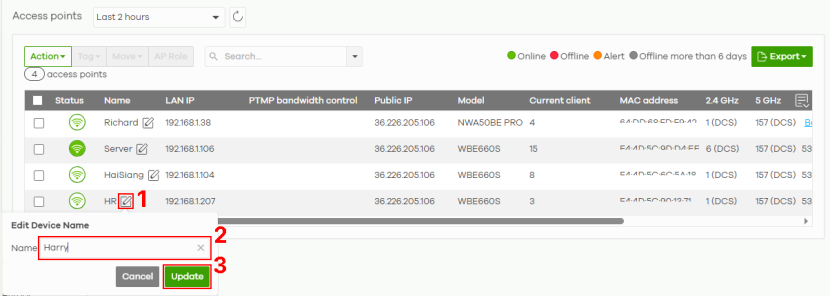
2 Click the Edit icon (1). The Edit Device Name window appears.
3 Enter a new descriptive name, 1 to 64 characters including 0–9 a–z A–Z `~!@#$%&*(_+-={}|[];'"./<> ?) in Name (2).
 Changing the Nebula Device name will not affect the Nebula Devices configuration in NCC.
 4 Then, click Update (3).
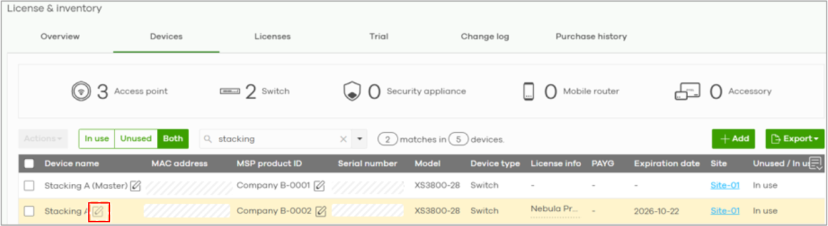
Nebula Switches in a Stack In a stacking configuration, the name of the master Nebula Switch can be changed. The backup Nebula Switch automatically inherits and shares the master’s name. The edit icon of the backup Nebula Switch is disabled (grayed-out) within the stack.
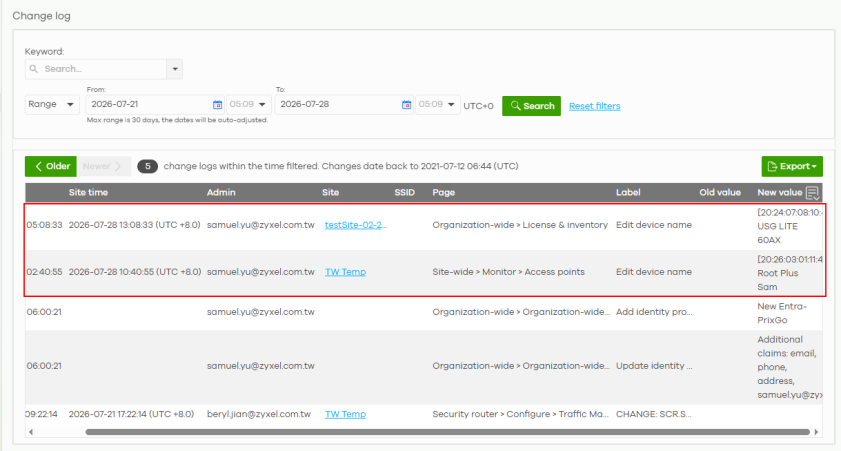
Every Nebula Device name change is recorded in the Organization-wide > Organization-side manage > Change log screen. It includes the administrator doing the name change, previous and new name of the Nebula Device, NCC page the name change was done, and the timestamp. The log feature is free and requires no additional license.