Access Point
Overview
This chapter discusses the menus that you can use to monitor the Nebula-managed APs (Access Points) in your network and configure settings even before an AP is deployed and added to the site.
Nebula AP refers to Zyxel Hybrid APs (NAP / NWA / WAC / WAX / WBE Series / IAP500BE) in this chapter. To view the list of Nebula APs that can be managed through NCC, go to Help > Support tools > Device function table.
The following features in the Access Point menus apply to specific models only.
features/fields | Included Nebula APs | location |
|---|---|---|
Ethernet Secure Tunnel Setting in Remote AP Setting | WAC500H | Click a Nebula AP entry in the Site-wide > Devices > Access point screen to display individual Nebula AP statistics. |
Wired stations | ||
Ethernet Traffic options Forwarding Mode | WAC500H | Click an entry in the Port setting table of the Site-wide > Configure > Access point > AP & port settings screen to access the Edit – AP & port settings screen. See Edit Port Settings for more information. |
Nebula Smart Mesh
Nebula Smart Mesh, also called Smart Mesh or AP Smart Mesh, is a WiFi mesh solution for Nebula APs. With Smart Mesh, you can have two or more Nebula APs automatically create a mesh network within your home or office, ensuring there are no areas with a weak WiFi signal.
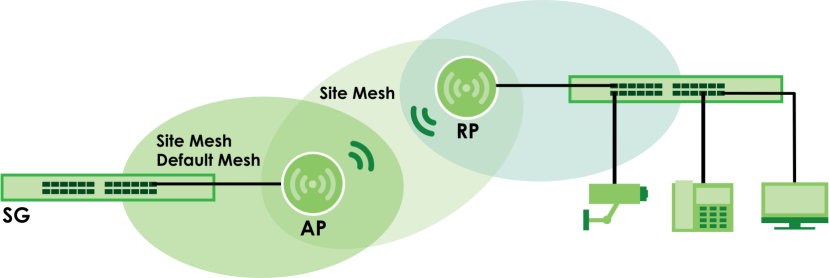
Nebula Smart Mesh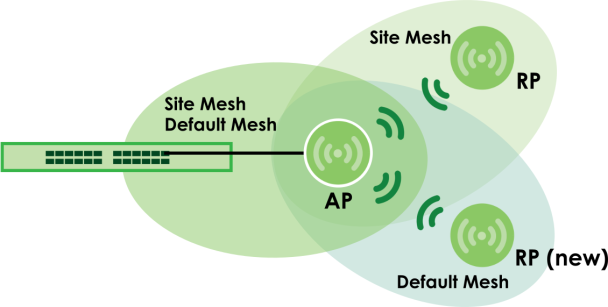
Smart Mesh assigns a role to each Nebula AP depending on its connection method.
• Root AP (AP): A Nebula AP (mesh controller) that is connected to the network by Ethernet and can reach the gateway device.
• Repeater AP (RP): A Nebula AP (mesh extender) that is connected to the network wirelessly, or that is connected to the network by Ethernet but cannot reach the gateway device.
The mesh extender rebroadcast the mesh controller’s SSID, and then relay WiFi traffic back to the gateway.
To create a Smart Mesh network, add two or more Nebula APs to the same Nebula-managed site and ensure that each Nebula AP has Smart Mesh enabled. Then connect one or more Nebula APs to your network’s gateway using an Ethernet cable, so that you have at least one mesh controller. Finally, place one or more non-wired Nebula APs in areas where you want to extend WiFi coverage.
Smart Mesh Network Topology
After you add a Nebula AP to an NCC site and then turn it on, the new Nebula AP automatically connects to a mesh network called the default mesh. The Nebula AP then tries to connect to a mesh controller and contact NCC. After the Nebula AP successfully contacts NCC and joins the site, the Nebula AP stops using the default mesh and instead connects to other Nebula APs in the site using a dedicated network called the site mesh.
Smart Mesh Wireless Hops
Each mesh extender tries to connect to the site gateway through a mesh controller. If a mesh extender cannot connect directly to a mesh controller, then the mesh extender relays its WiFi traffic through another mesh extender. Each time traffic passes through a WiFi connection in the mesh network, it counts as one hop.
Nebula Smart Mesh supports an unlimited number of hops. However, each hop (H) in a mesh network reduces network throughput (TP) by up to half. Therefore, we recommend only allowing a maximum of two hops within your Smart Mesh network.
Nebula Smart Mesh Wireless Hops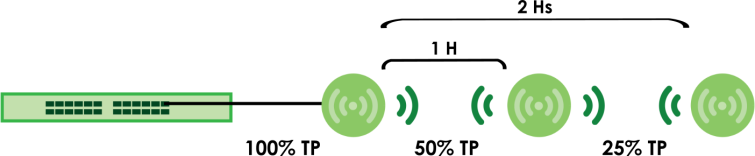
Wireless Bridge
Wireless bridge is a Smart Mesh feature that allows two Nebula APs to automatically connect two network segments together over a WiFi connection. This is useful when you want to extend your wired network to a new area, but it is difficult to run cables to that area.
To use wireless bridge, enable Wireless Bridge on two Nebula APs (AP, RP) in NCC. Then connect wired clients to one of the Nebula AP’s LAN port. These wired clients form a new network segment and are able to reach the site gateway (SG) through the Nebula AP’s WiFi connection.
Nebula Smart Mesh Wireless Bridge