MSP Branding
The Dashboard logo section of this screen allows you to replace the Nebula Control Center logo with a new MSP logo. The Customize Nebula Control Center URL section allows you to set a custom domain for your MSP. A custom domain is a web address that you can use instead of the default NCC URL, nebula.zyxel.com. You can also assign different custom domains to different organizations. This can help distinguish services provided for different customers and maintain your MSP’s brand identity throughout their experience. The Support contact section allows addition of a customized message or MSP contact information in the Help > Support request page. To access this screen, click MSP > MSP cross-org manage > MSP branding.
MSP > MSP cross-org manage > MSP branding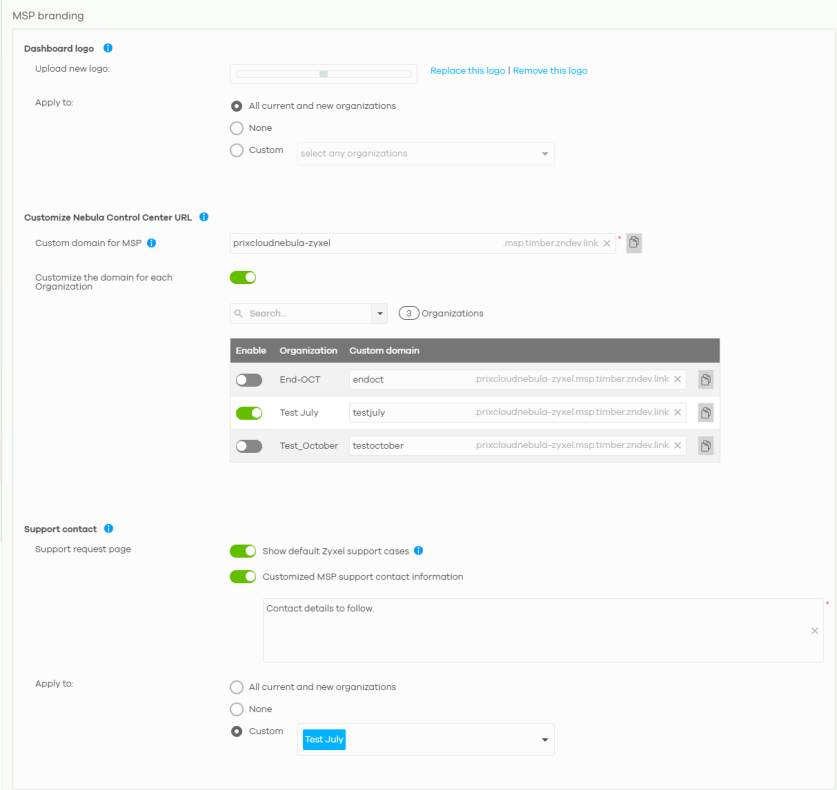
The following table describes the labels in this screen.
Label | Description |
|---|---|
Dashboard logo | |
Upload new logo | Click this to browse for the location of the image file to be used as your dashboard logo for the organization. All the administrators for the organization will see this logo. • Allowed image file formats: JPG/JPEG, PNG, GIF. • Maximum image file size: 200 KB. • NCC converts the image file to a 160 x 44 pixel logo after uploading. |
Replace this logo | Click this to browse for the location of the image file to replace your current dashboard logo. |
Remove this logo | Click this to remove your current dashboard logo. |
Apply to | Select All current and new organizations to apply the logo to all Nebula Professional Pack organization dashboards. Select Custom to choose which Nebula Professional Pack organization to apply the logo. Select None if you only wish to upload the image file but will not apply it yet. |
Customize Nebula Control Center URL | |
Custom domain for MSP | Enter a valid domain name for your MSP. Follow these domain name rules: • Use only lowercase letters (a–z), digits (0–9), and hyphens (–). Uppercase letters are automatically converted to lowercase after saving. • Do not start a label with a hyphen (–). • Must contain 1 to 63 characters. • Do not use spaces. • Each custom domain name must be unique. Duplicate names are not allowed. Changes may take up to 5 minutes to take effect. Click the Copy icon (  ) to copy the domain name. |
Customize the domain for each organization | Click the switch to the right to assign a different domain name to each organization in the table. By default, NCC uses the first 60 characters of the organization name as the Custom domain name. NCC automatically converts uppercase letters to lowercase. You can enter a valid Custom domain name for each organization.  The same domain name rules apply here as for the MSP. |
Support contact Support request page | |
Show default Zyxel support cases | Select ON to display the standard Zyxel support contact information in the Help > Support request screen. Organization owners can choose to hide the default Help > Support screen section to only show their information to clients. But the organization owner and administrators with full privilege will still see the hidden default screen section. |
Customized MSP support contact information | Create your own support contact information. Enter up to 1000 characters in this field including special characters inside the square quotes [~!@#$%^&*()_+{}|:”<>?–=[]\;’,./]. |
Apply to | Select All current and new organizations to apply the support contact information to all Nebula Professional Pack organization Help > Support request screens. Select Custom to choose which Nebula Professional Pack organization to apply the support contact information. Select None if you only wish to save the settings but will not apply it yet. |