Map/Photo
Click the Map tab. This shows the location of the Nebula Broadband Router on Google map. To upload a photo of the Nebula Broadband Router, select the Photo tab.
Site-wide > Devices > Broadband router > Map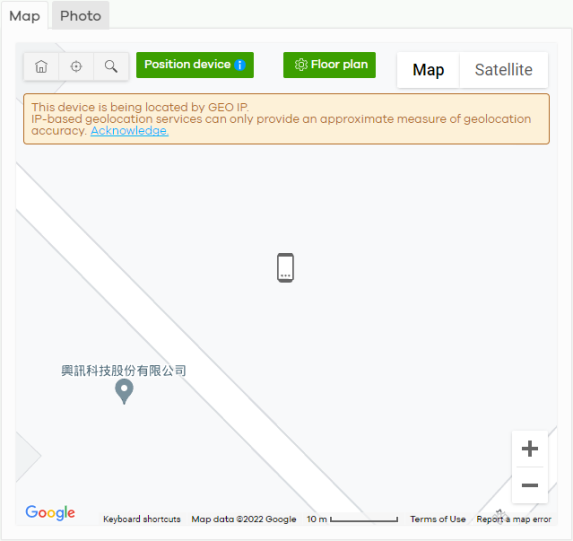
The following table describes the labels in this screen.
Label | Description |
|---|---|
Map | This shows the location of the Nebula Broadband Router on Google Maps (Map view or Satellite imagery view) or on a floor plan. Click Floor plan to display a list of existing floor plans. Each floor plan has a drawing that shows the rooms scaled and viewed from above. Drag-and-drop your Nebula Broadband Router directly on the Google map or click Position device to update the Nebula Broadband Router’s address (physical location). 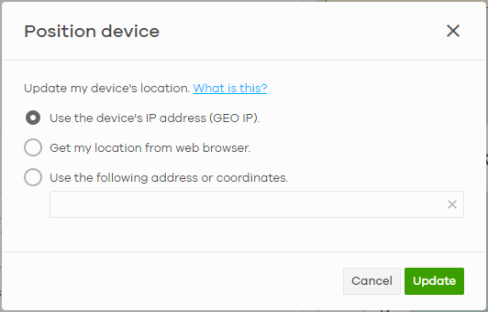 • Select GEO IP to use the public IP address of the Nebula Broadband Router. • Select Get my location from web browser to use the public IP address of the computer accessing the NCC portal. • Select Use the following address or coordinates to enter the complete address or coordinates of the Nebula Broadband Router.  Nebula Broadband Routers that are offline cannot use GEO IP. |
Photo | This shows the photo of the Nebula Broadband Router. Click Add to upload up to five photos of your Nebula Broadband Router. Click the remove icon (  ) to delete a photo. |