Log
What You Need To Know
The following terms and concepts may help as you read this chapter.
Alerts and Logs
An alert is a type of log that warrants more serious attention. They include system errors, attacks (access control) and attempted access to blocked web sites. Some categories such as System Errors consist of both logs and alerts. You may differentiate them by their color in the View Log screen. Alerts display in red and logs display in black.
Syslog Overview
The syslog protocol allows devices to send event notification messages across an IP network to syslog servers that collect the event messages. A syslog-enabled device can generate a syslog message and send it to a syslog server.
Syslog is defined in RFC 3164. The RFC defines the packet format, content and system log related information of syslog messages. Each syslog message has a facility and severity level. The syslog facility identifies a file in the syslog server. Refer to the documentation of your syslog program for details. The following table describes the syslog severity levels.
code | severity |
|---|---|
0 | Emergency: The system is unusable. |
1 | Alert: Action must be taken immediately. |
2 | Critical: The system condition is critical. |
3 | Error: There is an error condition on the system. |
4 | Warning: There is a warning condition on the system. |
5 | Notice: There is a normal but significant condition on the system. |
6 | Informational: The syslog contains an informational message. |
7 | Debugging: The message is intended for debug-level purposes. |
System Log
Use the System Log screen to see the system logs. You can filter the entries by selecting a severity level and/or category. Click System Monitor > Log to open the System Log screen.
System Monitor > Log > System Log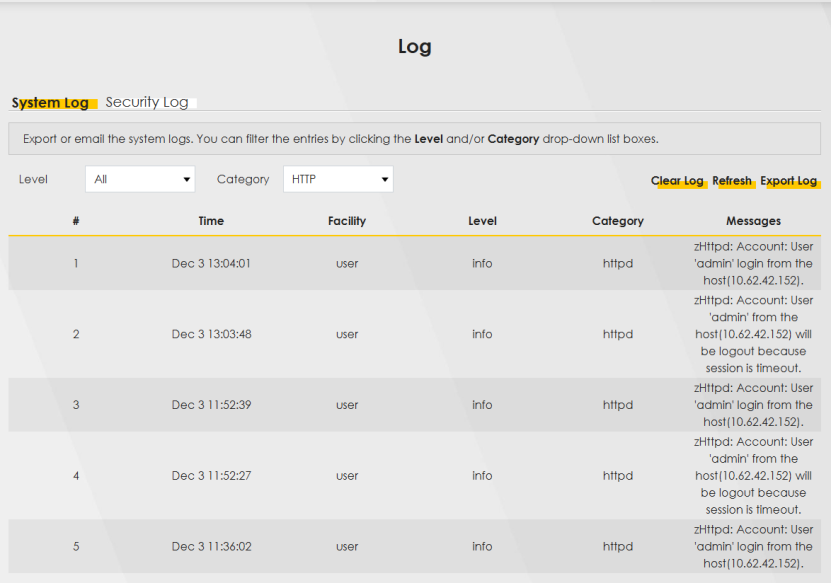
The following table describes the fields in this screen.
LABEL | Description |
|---|---|
Level | Select a severity level from the drop-down list box. This filters search results according to the severity level you have selected. When you select a severity, the Zyxel Device searches through all logs of that severity or higher. |
Category | Select the type of logs to display. |
Clear Log | Click this to delete all the logs. |
Refresh | Click this to renew the log screen. |
Export Log | Click this to export the selected logs. |
E-mail Log Now | Click this to send the log files to the email address you specify in the Maintenance > Log Setting screen. |
# | This field is a sequential value and is not associated with a specific entry. |
Time | This field displays the time the log was recorded. |
Facility | The log facility allows you to send logs to different files in the syslog server. Refer to the documentation of your syslog program for more details. |
Level | This field displays the severity level of the log that the Zyxel Device is to send to this syslog server. |
Category | This field displays the type of the log. |
Messages | This field states the reason for the log. |
Security Log
Use the Security Log screen to see the security-related logs for the categories that you select. You can filter the entries by selecting a severity level and/or category. Click System Monitor > Log > Security Log to open the following screen.
System Monitor > Log > Security Log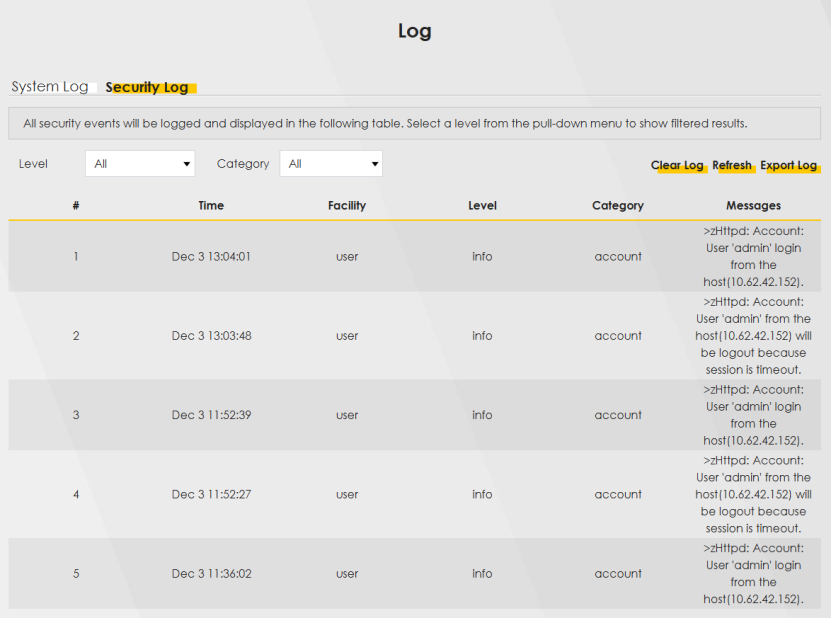
The following table describes the fields in this screen.
LABEL | Description |
|---|---|
Level | Select a severity level from the drop-down list box. This filters search results according to the severity level you have selected. When you select a severity, the Zyxel Device searches through all logs of that severity or higher. |
Category | Select the type of logs to display. |
Clear Log | Click this to delete all the logs. |
Refresh | Click this to renew the log screen. |
Export Log | Click this to export the selected logs. |
E-mail Log Now | Click this to send the log files to the email address you specify in the Maintenance > Log Setting screen. |
# | This field is a sequential value and is not associated with a specific entry. |
Time | This field displays the time the log was recorded. |
Facility | The log facility allows you to send logs to different files in the syslog server. Refer to the documentation of your syslog program for more details. |
Level | This field displays the severity level of the log that the Zyxel Device is to send to this syslog server. |
Category | This field displays the type of the log. |
Messages | This field states the reason for the log. |