TR-069 Client
TR-069 Overview
This chapter explains how to configure the Zyxel Device’s TR-069 auto-configuration settings.
TR-069 Client
TR-069 is a protocol that defines how your Zyxel Device can be managed via a management server. TR-069 is based on sending Remote Procedure Calls (RPCs) between an (Auto-Configuration Server) ACS and a client device. RPCs are sent in Extensible Markup Language (XML) format over HTTP or HTTPS. You can use a management server to remotely set up the Zyxel Device, modify settings, perform firmware upgrades as well as monitor and diagnose the Zyxel Device.
XMPP
If a remotely-managed Zyxel Device is behind a NAT router and has a private IP address, then the ACS cannot communicate directly with the Zyxel Device. In this case, the Zyxel Device needs to communicate with the ACS through an XMPP server.
XMPP Connection Request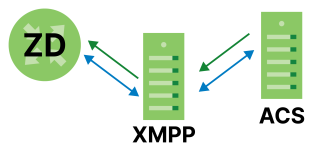
Click Maintenance > TR-069 Client to open the following screen.
Maintenance > TR-069 Client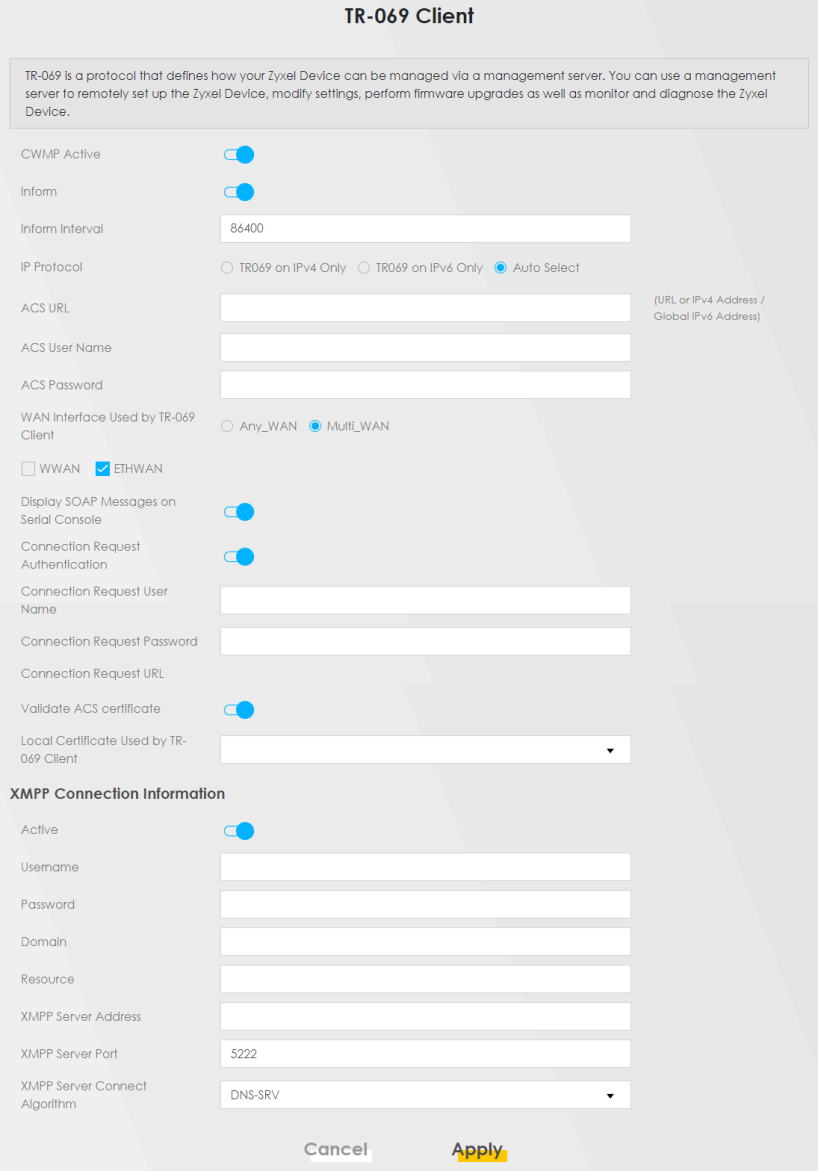
The following table describes the fields in this screen.
Label | Description |
|---|---|
CWMP Active | CPE WAN Management Protocol (CWMP) enables the Zyxel Device to be remotely configured through a WAN link. Communication between the Zyxel Device and the management server is conducted through SOAP/HTTP(S) in the form of remote procedure calls (RPC). Click to enable (switch turns blue) to allow the Zyxel Device to be managed by a management server. Otherwise, click to disable (switch turns gray) to disallow the Zyxel Device to be managed by a management server. |
Inform | Click to enable (switch turns blue) the Zyxel Device to send periodic inform through TR-069 on the WAN. Otherwise, click to disable (switch turns gray). |
Inform Interval | Enter the time interval (in seconds) at which the Zyxel Device sends information to the auto-configuration server. |
IP Protocol | Select the type of IP protocol to allow TR-069 to operate on. |
ACS URL | Enter the URL or IP address of the auto-configuration server. |
ACS User Name | Enter the TR-069 user name for authentication with the auto-configuration server. |
ACS Password | Enter the TR-069 password for authentication with the auto-configuration server. |
WAN Interface Used by TR-069 Client | Select a WAN interface through which the TR-069 traffic passes. If you select Any_WAN, the Zyxel Device automatically passes the TR-069 traffic when any WAN connection is up. If you select Multi_WAN, you also need to select two or more pre-configured WAN interfaces. The Zyxel Device automatically passes the TR-069 traffic when one of the selected WAN connections is up. |
Display SOAP Messages on Serial Console | Click to enable (switch turns blue) the dumping of all SOAP messages during the ACS server communication with the CPE. |
Connection Request User Name | Enter the connection request user name. When the ACS makes a connection request to the Zyxel Device, this user name is used to authenticate the ACS. |
Connection Request Password | Enter the connection request password. When the ACS makes a connection request to the Zyxel Device, this password is used to authenticate the ACS. |
Connection Request URL | This shows the connection request URL. The ACS can use this URL to make a connection request to the Zyxel Device. |
Supplementary ACS URL | Enter the URL or IP address of an additional TR-069 auto-configuration server. |
Supplementary ACS User Name | Enter the user name of an additional TR-069 auto-configuration server for authentication. |
Supplementary ACS Password | Enter the password of an additional TR-069 auto-configuration server for authentication. |
Validate ACS Certificate | Click to enable (switch turns blue) the validation of a local certificate used by TR-069 client. |
Local Certificate Used by TR-069 Client | You can choose a local certificate used by TR-069 client. The local certificate should be imported in the Security > Certificates > Local Certificates screen. |
XMPP Server Address | Enter the IP address of the XMPP server. The Zyxel Device will use the address to connect to the XMPP server. |
XMPP Server Port | Enter the TCP port reserved for the XMPP server. The default is 5222. (1 – 65535) |
Apply | Click Apply to save your changes. |
Cancel | Click Cancel to restore the screen’s last saved settings. |