Multicast
Multicast Overview
This chapter shows you how to configure various multicast features.
Traditionally, IP packets are transmitted in one of either two ways – Unicast (one sender to one recipient) or Broadcast (one sender to everybody on the network). Multicast delivers IP packets to just a group of hosts on the network.
What You Need to Know
IGMP Proxy
Internet Group Management Protocol (IGMP) proxy is used for multicast routing. IGMP proxy enables the Zyxel Device to issue IGMP host messages on behalf of hosts that the Zyxel Device discovered on its IGMP-enabled interfaces. The Zyxel Device acts as a proxy for its hosts. Refer to the following figure.
• DS: Downstream traffic
• US: Upstream traffic
• R: Router
• MS: Multicast Server
• Enable IGMP Upstream (US) on the Zyxel Device interface that connects to a router (R) running IGMP that is closer to the multicast server (MS).
• Enable IGMP Downstream on the Zyxel Device interface which connects to the multicast hosts.
IGMP Proxy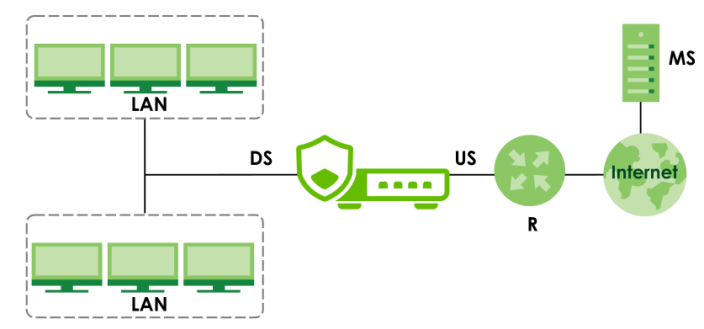
mDNS
Multicast DNS (mDNS) is a protocol that sends discovery packets to resolve hostnames to IP addresses on a local network without using a DNS server. It is commonly used by zero-configuration services that require no manual IP or DNS setup, such as printers, TVs, AirPlay, Chromecast, and IoT devices.
mDNS uses a query and response exchange to allow devices to find each other and then establish a communication session. In the following scenario, the mobile phone (C1) connects to the printer (C2) on the same LAN.
Step1: Query
C1 sends out multicast discovery packets with host name C2 to multicast address 224.0.0.251 on port 5353 used for the mDNS queries.
Step 2: Response
C2 receives the multicast query and responds with its IP address.
Step 3: Session Established
C1 receives the response from C2 and obtains its IP address. C1 and C2 have established a communication session.
mDNS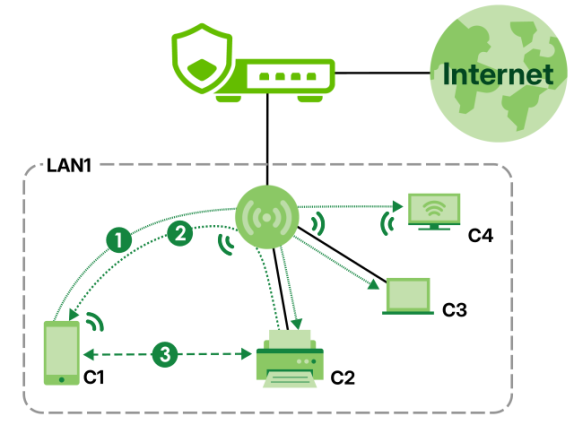
mDNS Proxy
mDNS discovery is only sent to a local network multicast address (224.0.0.251:5353). The Zyxel Device supports mDNS Proxy that allows the Zyxel Device to act as a the mDNS reflector to transmit the multicast discovery packets across subnets.
The examples below show how the mobile phone (C1) on LAN1 connects to the laptop (C2) on LAN2 through the Zyxel Device by using the mDNS Proxy feature.
With mDNS Proxy Disabled
When mDNS Proxy is disabled, the multicast discovery packets cannot be sent out of LAN1. Therefore, C2 does not receive the query.
mDNS Proxy Disabled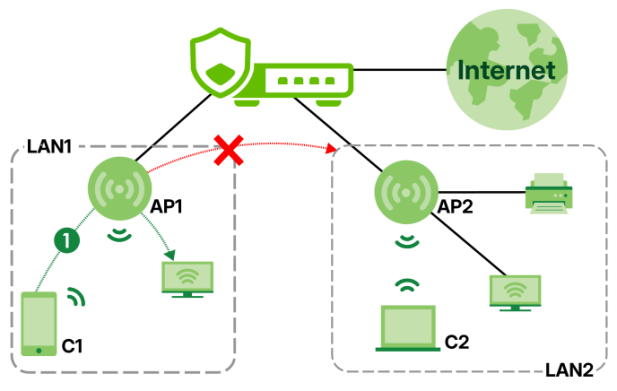
With mDNS Proxy Enabled
When the mDNS Proxy is enabled and the LAN1 and LAN2 interfaces are configured as Allowed Interfaces, the connection between C1 and C2 is successful.
mDNS Proxy Enabled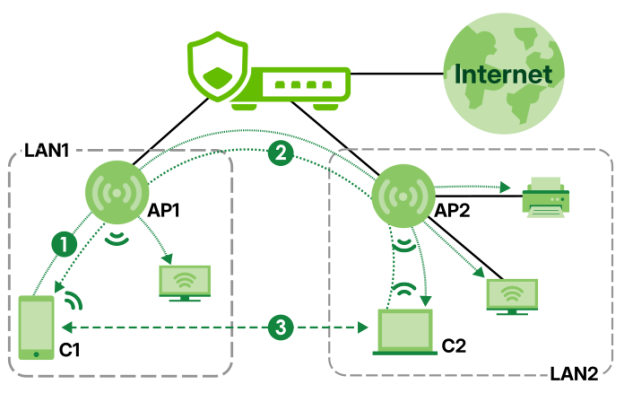
The Multicast Screen
Click Network > Multicast to open the Multicast screen. Use this screen to:
• Turn IGMP Proxy off or on
• Configure multicast traffic
• View multicast traffic status
The following table describes the labels in this screen.
Label | Description |
|---|---|
IGMP Proxy | |
Enable | Turn on the IGMP Proxy to enable the Zyxel Device to route multicast traffic. |
Multicast Address Reception | Allow all Multicast Addresses: Select this to have the Zyxel Device send all multicast traffic to all the IGMP hosts.  If too much multicast traffic congests your network, you may choose the following option. If too much multicast traffic congests your network, you may choose the following option.Allow the Following Multicast Addresses: Multicast addresses from the WAN are blocked by default. Select this to have the Zyxel Device forward specific multicast addresses from the WAN to the selected IGMP hosts. Click the edit icon to select existing IP address objects or create new ones. |
Upstream Interface | Select the interface that connects to a gateway running IGMP and can receive traffic from the multicast server. You can assign Ethernet, VLAN, Bridge, or LAG interfaces as IGMP Proxy upstream interfaces. |
Downstream Interface | Select the interface that connects to the multicast hosts. You can assign Ethernet, VLAN, Bridge, or LAG interfaces as IGMP Proxy downstream interfaces. |
mDNS Proxy | |
Enable | Turn on the mDNS Proxy to enable the Zyxel Device to route mDNS multicast traffic across subnets. |
Allowed Interfaces | Select the internal interfaces that mDNS multicast packets are allowed to pass. Devices on the selected interfaces can receive and forward mDNS multicast packets. You can select up to four interfaces. Only internal interfaces you configured on Network > Interface > Interfaces are allowed. |
Multicast Status | This shows information about which multicast groups are currently active and how the multicast traffic pass through the Zyxel Device. |
Group | This shows the multicast group IP address the multicast traffic belongs to. The multicast traffic in this group is forwarded to the downstream interfaces. |
Source IP | This shows the IP address of the multicast server. |
Upstream Interface | This shows the interfaces on which the Zyxel Device receives multicast traffic. |
Downstream Interface | This shows the interfaces to which the Zyxel Device forwards multicast traffic. |
Apply | Click Apply to save your changes back to the Zyxel Device. |
Cancel | Click Cancel to return the screen to its last-saved settings. |