IPv6 Neighbor Table
IPv6 Neighbor Table Overview
This chapter introduces the IPv6 neighbor table.
An IPv6 host is required to have a neighbor table. If there is an address to be resolved or verified, the Switch sends out a neighbor solicitation message. When the Switch receives a neighbor advertisement in response, it stores the neighbor’s link-layer address in the neighbor table. You can also manually create a static IPv6 neighbor entry using the SYSTEM > IPv6 > IPv6 Neighbor Setup screen.
When the Switch needs to send a packet, it first consults other table to determine the next hop. Once the next hop IPv6 address is known, the Switch looks into the neighbor table to get the link-layer address and sends the packet when the neighbor is reachable. If the Switch cannot find an entry in the neighbor table or the state for the neighbor is not reachable, it starts the address resolution process. This helps reduce the number of IPv6 solicitation and advertisement messages.
Viewing the IPv6 Neighbor Table
Use this screen to view IPv6 neighbor information on the Switch. Click MONITOR > IPv6 Neighbor Table > IPv6 Neighbor Table in the navigation panel to display the screen as shown.
MONITOR > IPv6 Neighbor Table > IPv6 Neighbor Table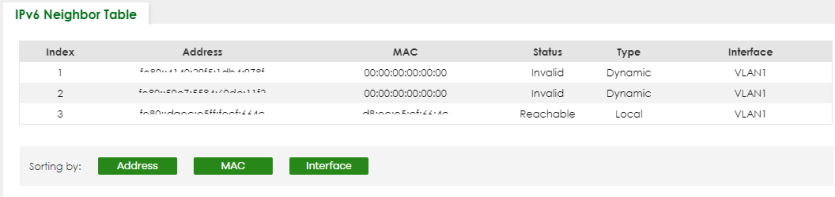
The following table describes the labels in this screen.
label | Description |
|---|---|
Index | This field displays the index number of each entry in the table. |
Address | This field displays the IPv6 address of the Switch or a neighboring device. |
MAC | This field displays the MAC address of the IPv6 interface on which the IPv6 address is configured or the MAC address of the neighboring device. |
Status | This field displays whether the neighbor IPv6 interface is reachable. In IPv6, “reachable” means an IPv6 packet can be correctly forwarded to a neighbor node (host or router) and the neighbor can successfully receive and handle the packet. The available options in this field are: • Reachable (R): The interface of the neighboring device is reachable. (The Switch has received a response to the initial request.) • Stale (S): The last reachable time has expired and the Switch is waiting for a response to another initial request. The field displays this also when the Switch receives an unrequested response from the neighbor’s interface. • Delay (D): The neighboring interface is no longer known to be reachable, and traffic has been sent to the neighbor recently. The Switch delays sending request packets for a short to give upper-layer protocols a chance to determine reachability. • Probe (P): The Switch is sending request packets and waiting for the neighbor’s response. • Invalid (IV): The neighbor address is with an invalid IPv6 address. • Unknown (?): The status of the neighboring interface cannot be determined for some reason. • Incomplete (I): Address resolution is in progress and the link-layer address of the neighbor has not yet been determined. The interface of the neighboring device did not give a complete response. |
Type | This field displays the type of an address mapping to a neighbor interface. The available options in this field are: • Other (O): none of the following type. • Local (L): A Switch interface is using the address. • Dynamic (D): The IP address to MAC address can be successfully resolved using IPv6 Neighbor Discovery protocol. Is it similar as IPv4 ARP (Address Resolution protocol). • Static (S): The interface address is statically configured. |
Interface | This field displays the ID number of the IPv6 interface on which the IPv6 address is created or through which the neighboring device can be reached. |
Sorting by | Click one of the following buttons to display and arrange the data according to that button type. The result is then displayed in the summary table above. |
Address | Click this button to display and arrange the data according to IPv6 address. |
MAC | Click this button to display and arrange the data according to MAC address. |
Interface | Click this button to display and arrange the data according to IPv6 interface. |