Green Ethernet
This chapter shows you how to configure the Switch to reduce the power consumed by switch ports.
Green Ethernet Overview
Green Ethernet reduces switch port power consumption in the following ways.
IEEE 802.3az Energy Efficient Ethernet (EEE)
If EEE is enabled, both sides of a link support EEE and there is no traffic, the port enters Low Power Idle (LPI) mode. LPI mode turns off some functions of the physical layer (becomes quiet) to save power. Periodically the port transmits a REFRESH signal to allow the link partner to keep the link alive. When there is traffic to be sent, a WAKE signal is sent to the link partner to return the link to active mode.
Auto Power Down
Auto Power Down turns off almost all functions of the port’s physical layer functions when the link is down, so the port only uses power to check for a link up pulse from the link partner. After the link up pulse is detected, the port wakes up from Auto Power Down and operates normally.
Short Reach
Traditional Ethernet transmits all data with enough power to reach the maximum cable length. Shorter cables lose less power, so Short Reach saves power by adjusting the transmit power of each port according to the length of cable attached to that port.
Configure Green Ethernet
Click PORT > Green Ethernet > Green Ethernet in the navigation panel to display the screen as shown.
 This feature is only available on copper ports. Checkboxes of SFP ports are grayed out and cannot be selected.EEE, Auto Power Down and Short Reach are NOT supported on an uplink port.
PORT > Green Ethernet > Green Ethernet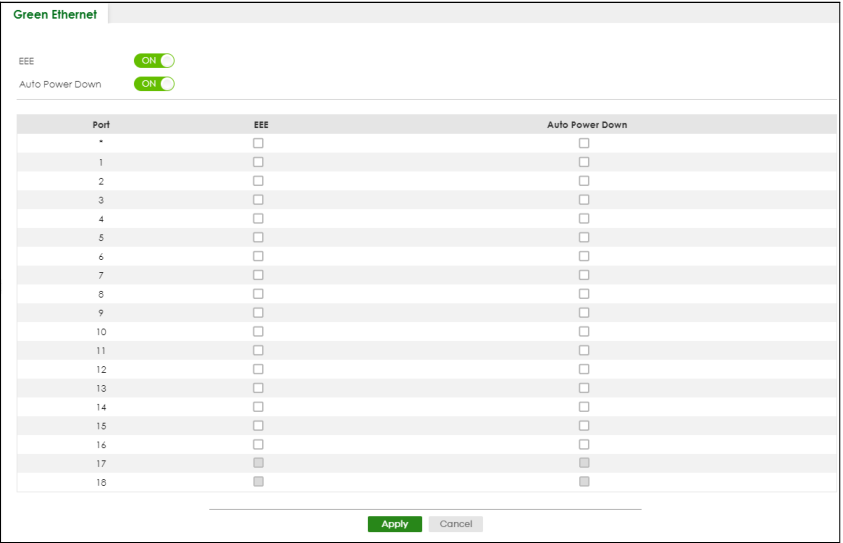
The following table describes the labels in this screen.
label | description |
|---|---|
EEE | Enable the switch button to activate Energy Efficient Ethernet globally. |
Auto Power Down | Enable the switch button to activate Auto Power Down globally. |
Port | This field displays the port number. |
* | Use this row to make the setting the same for all ports. Use this row first and then make adjustments to each port if necessary. Changes in this row are copied to all the ports as soon as you make them. |
EEE | Select this to activate Energy Efficient Ethernet on this port. |
Auto Power Down | Select this to activate Auto Power Down on this port. |
Apply | Click Apply to save your changes to the Switch’s run-time memory. The Switch loses these changes if it is turned off or loses power, so use the Save link on the top navigation panel to save your changes to the non-volatile memory when you are done configuring. |
Cancel | Click Cancel to begin configuring this screen afresh. |