VLAN Isolation
This chapter shows you how to configure the Switch to prevent communications between ports in a VLAN.
VLAN Isolation Overview
VLAN Isolation allows you to do port isolation within a VLAN in a simple way. You specify which ports in a VLAN (VLAN 123) is not isolated by adding it to the promiscuous port (PP) list. The Switch automatically adds other ports in this VLAN (VLAN 123) to the isolated port (IP) list and blocks traffic between the isolated ports (IP). A promiscuous port (PP) can communicate with any port in the same VLAN (VLAN 123). An isolated port (IP) can communicate with the promiscuous ports (PP) only.
 You can have up to one VLAN Isolation rule for each VLAN.
 VLAN Isolation Example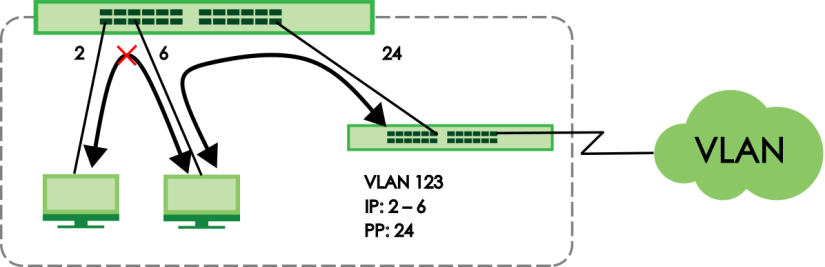
Make sure you keep at least one port in the promiscuous port list for a VLAN with VLAN Isolation enabled. Otherwise, this VLAN is blocked from the whole network.Configuring VLAN Isolation
Click SWITCHING > VLAN Isolation > VLAN Isolation in the navigation panel to display the screen as shown.
SWITCHING > VLAN Isolation > VLAN Isolation
The following table describes the labels in this screen.
label | description |
|---|---|
Index | This is the index number of the rule. |
Active | This shows whether this rule is activated or not. |
Name | This is the descriptive name for this rule. |
VLAN ID | This is the VLAN to which this rule is applied. |
Promiscuous Ports | This shows the ports that can communicate with any ports in the same VLAN. |
Select an entry’s checkbox to select a specific entry. Otherwise, select the checkbox in the table heading row to select all entries. | |
Add/Edit | Click Add/Edit to add a new entry or edit a selected one. |
Delete | Click Delete to remove the selected entries. |
Add/Edit a VLAN Isolation Rule
Click Add/Edit, or select an entry and click Add/Edit in the SWITCHING > VLAN Isolation > VLAN Isolation screen to display this screen.
SWITCHING > VLAN Isolation > VLAN Isolation > Add/Edit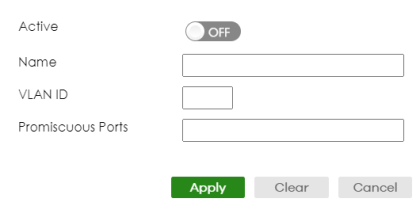
The following table describes the labels in this screen.
label | description |
|---|---|
Active | Enable the switch button to enable VLAN Isolation in a VLAN. |
Name | Enter a descriptive name (up to 32 printable ASCII characters except [ ? ], [ | ], [ ' ], [ " ], or [ , ]) for identification purposes. |
VLAN ID | Enter a VLAN ID from 1 to 4094. This is the VLAN to which this rule applies. |
Promiscuous Ports | Enter the number of the ports that can communicate with any ports in the same VLAN. Other ports belonging to this VLAN will be added to the isolation list and can only send and receive traffic from the ports you specify here. |
Apply | Click Apply to save your changes to the Switch’s run-time memory. The Switch loses these changes if it is turned off or loses power, so use the Save link on the top navigation panel to save your changes to the non-volatile memory when you are done configuring. |
Clear | Click Clear to clear the fields to the factory defaults. |
Cancel | Click Cancel to not save the configuration you make and return to the last screen. |