Storm Control
Storm Control Overview
This chapter introduces and shows you how to configure the storm control feature.
Storm control limits the number of broadcast, multicast and destination lookup failure (DLF) packets the Switch receives per second on the ports. When the maximum number of allowable broadcast, multicast and/or DLF packets is reached per second, the subsequent packets are discarded. Enable this feature to reduce broadcast, multicast and/or DLF packets in your network. You can specify limits for each packet type on each port.
What You Can Do
Use the Storm Control screen (Storm Control Setup) to limit the number of broadcast, multicast and destination lookup failure (DLF) packets the Switch receives per second on the ports.
Storm Control Setup
Click SECURITY > Storm Control > Storm Control in the navigation panel to display the screen as shown next.
SECURITY > Storm Control > Storm Control (Standalone Mode)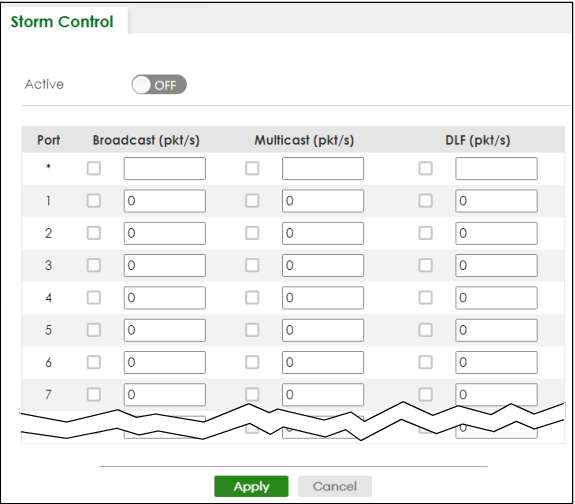
SECURITY > Storm Control > Storm Control (Stacking Mode)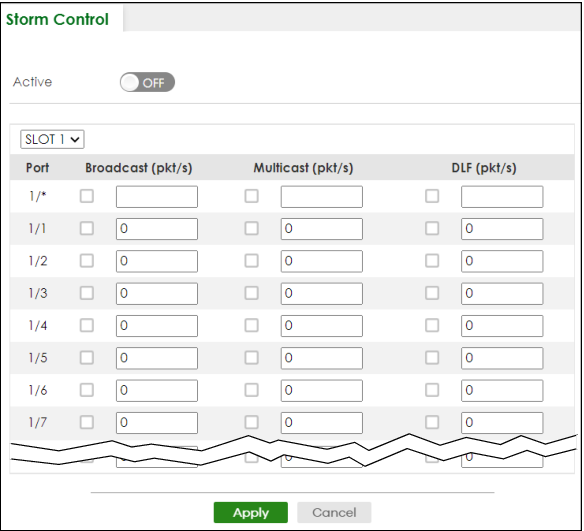
The following table describes the labels in this screen.
label | description |
|---|---|
Active | Enable the switch button to enable traffic storm control on the Switch. Disable the switch button to disable this feature. |
SLOT | This field appears only in Stacking mode. Click the drop-down list to choose the slot number of the Switch in a stack. |
Port | This field displays the port number. In Stacking mode, the first number represents the slot ID and the second is the port number. Please note that the default stacking ports (the last four ports of your Switch) cannot be configured. They are reserved for stacking only. |
* | Settings in this row apply to all ports. Use this row only if you want to make some settings the same for all ports. Use this row first to set the common settings and then make adjustments on a port-by-port basis.  Changes in this row are copied to all the ports as soon as you make them. |
Broadcast (pkt/s) | Select this option to enable and specify how many broadcast packets the Switch accepts per second on the port. The Switch will generate a trap and/or log when the actual rate is higher than the specified threshold. |
Multicast (pkt/s) | Select this option to enable and specify how many multicast packets the Switch accepts per second on the port. The Switch will generate a trap and/or log when the actual rate is higher than the specified threshold. |
DLF (pkt/s) | Select this option and specify how many destination lookup failure (DLF) packets the port receives per second. |
Apply | Click Apply to save your changes to the Switch’s run-time memory. The Switch loses these changes if it is turned off or loses power, so use the Save link on the top navigation panel to save your changes to the non-volatile memory when you are done configuring. |
Cancel | Click Cancel to reset the fields. |