Queuing Method
Queuing Method Overview
This section introduces the queuing methods supported.
Queuing is used to help solve performance degradation when there is network congestion. Use the Queuing Method screen to configure queuing algorithms for outgoing traffic. See also Priority Queue Assignment in the SWITCHING > QoS > Priority Queue screen and 802.1p Priority in the PORT > Port Setup > Port Setup screen for related information.
What You Can Do
Use the Queuing Method screen (Configure Queuing) to set priorities for the queues of the Switch. This distributes bandwidth across the different traffic queues.
What You Need to Know
Queuing algorithms allow switches to maintain separate queues for packets from each individual source or flow and prevent a source from monopolizing the bandwidth.
Strictly Priority Queuing (SPQ)
Strictly Priority Queuing services queues based on priority only. As traffic comes into the Switch, traffic on the highest priority queue, Q7 is transmitted first. When that queue empties, traffic on the next highest-priority queue, Q6 is transmitted until Q6 empties, and then traffic is transmitted on Q5 and so on. If higher priority queues never empty, then traffic on lower priority queues never gets sent. SPQ does not automatically adapt to changing network requirements.
Weighted Fair Queuing (WFQ)
Weighted Fair Queuing is used to guarantee each queue's minimum bandwidth based on its bandwidth weight (portion) (the number you configure in the Weight field) when there is traffic congestion. WFQ is activated only when a port has more traffic than it can handle. Queues with larger weights get more guaranteed bandwidth than queues with smaller weights. This queuing mechanism is highly efficient in that it divides any available bandwidth across the different traffic queues. By default, the weight for Q0 is 1, for Q1 is 2, for Q2 is 3, and so on.
Weighted Round Robin Scheduling (WRR)
Round Robin Scheduling services queues on a rotating basis and is activated only when a port has more traffic than it can handle. A queue is given an amount of bandwidth irrespective of the incoming traffic on that port. This queue then moves to the back of the list. The next queue is given an equal amount of bandwidth, and then moves to the end of the list; and so on, depending on the number of queues being used. This works in a looping fashion until a queue is empty.
Weighted Round Robin Scheduling uses the same algorithm as round robin scheduling, but services queues based on their priority and queue weight (the number you configure in the queue Weight field) rather than a fixed amount of bandwidth. WRR is activated only when a port has more traffic than it can handle. Queues with larger weights get more service than queues with smaller weights. This queuing mechanism is highly efficient in that it divides any available bandwidth across the different traffic queues and returns to queues that have not yet emptied.
Weighted Elastic Round Robin Queuing (WERR)
Just like Weighted Fair Queuing, Weighted Elastic Round Robin is used to guarantee each queue's minimum bandwidth based on its bandwidth weight when there is traffic congestion. Weight is based on the volume of traffic, making them fairer and unaffected by packet size.
In a queue-based queuing algorithm (WRR, WERR), bandwidth allocation starts from the queue with the highest priority set by the feature priority queues. It considers the fairness of bandwidth allocation between queues.
In addition to fairness of bandwidth allocation between queues, a flow-based queuing (WFQ) uses an algorithm to try to ensure fairness in the flow within each queue.
Allocation is determined by weight, whether queue-based or flow-based.
feature | SPQ | wfq | werr | wrr |
|---|---|---|---|---|
Priority handling | Strict assigned priority | Weighted queues | Weighted queues | Weighted queues |
Delay risk | Zero delay for high priority queues, but low priority queues are only served when higher priority queue is empty. | Low | Moderate | High |
Fairness (controlled, predictable sharing of bandwidth) | None, priority applies | Highest, bandwidth is shared proportionally based on assigned weight | High, bandwidth is shared proportionally based on assigned weight | Moderate, every queue gets served. Fairness is affected by the actual packet size. |
Traffic awareness (VoIP packet, video, backup traffic) | Highest priority queues always go first, lower priority queues may wait a long time | Every flow gets its turn | Every queue gets its turn | Every queue gets its turn. Bandwidth accuracy is low due to varying packet sizes. |
Hardware usage | Extremely low | High | Low | Low |
Best used for | Real-time critical traffic (VoIP, video conferencing, controlled network traffic) | Balanced QoS for mixed network traffic environment where fairness matters | Balanced QoS for mixed network traffic environment where fairness matters | Simple bandwidth sharing for general purpose QoS |
Configure Queuing
Use this screen to set priorities for the queues of the Switch. This distributes bandwidth across the different traffic queues.
Click SWITCHING > QoS > Queuing Method to display the screen as shown below.
SWITCHING > QoS > Queuing Method (Standalone Mode)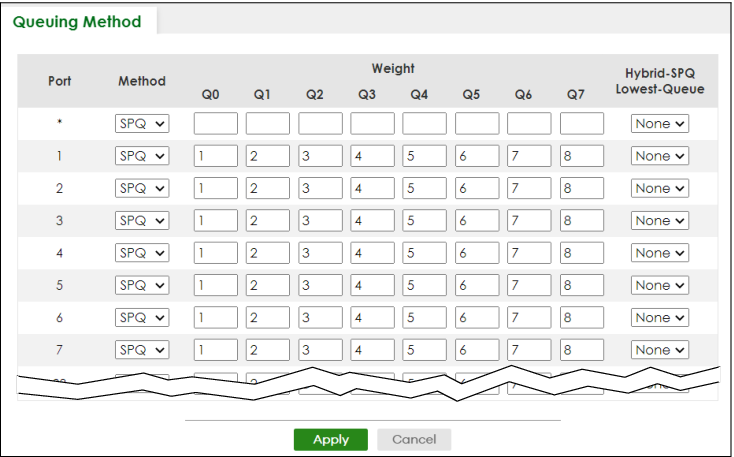
SWITCHING > QoS > Queuing Method (Stacking Mode)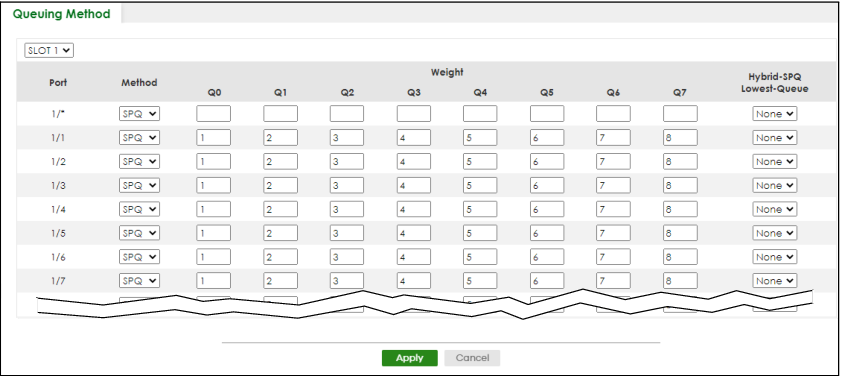
The following table describes the labels in this screen.
label | Description |
|---|---|
SLOT | This field appears only in Stacking mode. Click the drop-down list to choose the slot number of the Switch in a stack. |
Port | This field displays the port number. In Stacking mode, the first number represents the slot ID and the second is the port number. Please note that the default stacking ports (the last four ports of your Switch) cannot be configured. They are reserved for stacking only. |
* | Settings in this row apply to all ports. Use this row only if you want to make some settings the same for all ports. Use this row first to set the common settings and then make adjustments on a port-by-port basis.  Changes in this row are copied to all the ports as soon as you make them. |
Method | Select SPQ (Strictly Priority Queuing), WFQ (Weighted Fair Queuing), WRR (Weighted Round Robin), or WERR (Weighted Elastic Round Robin). Strictly Priority Queuing services queues based on priority only. When the highest priority queue empties, traffic on the next highest-priority queue begins. Q7 has the highest priority and Q0 the lowest. Weighted Fair Queuing is used to guarantee each queue's minimum bandwidth based on their bandwidth portion (Weight). Queues with larger weights get more guaranteed bandwidth than queues with smaller weights. Weighted Round Robin Scheduling services queues on a rotating basis based on their queue Weight. Queues with larger weights get more service than queues with smaller weights. Just like Weighted Fair Queuing, Weighted Elastic Round Robin Queuing is used to guarantee each queue's minimum bandwidth based on their bandwidth portion (Weight). Queues with larger weights get more guaranteed bandwidth than queues with smaller weights. |
Weight | When you select WFQ, WRR, or WERR, enter the queue weight here. Bandwidth is divided across the different traffic queues according to their weights. |
Hybrid-SPQ Lowest-Queue | This field is applicable only when you select WFQ, WRR, or WERR. Select a queue (Q0 to Q7) to have the Switch use SPQ to service the subsequent queues after and including the specified queue for the port. For example, if you select Q5, the Switch services traffic on Q5, Q6 and Q7 using SPQ. Select None to always use WFQ, WRR, or WERR for the port. |
Apply | Click Apply to save your changes to the Switch’s run-time memory. The Switch loses these changes if it is turned off or loses power, so use the Save link on the top navigation panel to save your changes to the non-volatile memory when you are done configuring. |
Cancel | Click Cancel to begin configuring this screen afresh. |