License Migration for Nebula USG FLEX H Series
This tutorial shows you how to transfer licenses that have not yet expired from USG FLEX or ATP Series to the USG FLEX H Series. Please see Calculating Remaining License Validity for more information on how the remaining time is calculated.
Conditions
To use license migration feature, the following conditions should be met:
• Same Nebula Device owner and product tier: Both USG FLEX or ATP Series and USG FLEX H Series must belong to the same Zyxel Account owner and Nebula Device tier (for example, USG FLEX 500 to USG FLEX 500H).
The following table describes the supported Nebula Firewalls license migration mapping at the time of writing.
usg flex or atp series | usg flex h series |
|---|---|
USG20(W)-VPN USG FLEX 50 USG FLEX 50AX | USG FLEX 50H / HP |
USG FLEX 100(W) USG FLEX 100AX | USG FLEX 100H / HP |
USG FLEX 200 ATP 200 | USG FLEX 200H / HP |
USG FLEX 500 ATP 500 | USG FLEX 500H / HP |
USG FLEX 700 ATP 700 ATP 800 | USG FLEX 700H |
• One-to-one mapping: Each USG FLEX H Series can receive license(s) from only one USG FLEX or ATP Series. You cannot combine licenses from multiple USG FLEX or ATP Series into one USG FLEX H Series.
• Life cycle limit: You can transfer license once for each Nebula Device.
• Irreversibility: Once you transfer a license from USG FLEX or ATP Series to USG FLEX H Series, you cannot transfer it back.
License Eligibility and Automatic Upgrade
The following table describes the supported Nebula Firewalls license types and automatic license upgrade upon transfer at the time of writing.
original license | transferred license |
|---|---|
Content Filter Pack | Gold Security Pack (automatic upgrade) |
UTM Pack | Gold Security Pack (automatic upgrade) |
Gold Security Pack | Gold Security Pack |
Secure WiFi | Secure WiFi |
Nebula Professional Pack | Nebula Professional Pack |
Nebula Plus Pack | Nebula Plus Pack |
 You can transfer active, deferred, and queued licenses. You cannot transfer trial licenses.
 Calculating Remaining License Validity
The following tables shows an example calculation of the remaining days of all non-trial licenses. These are summed and added to the USG FLEX 500H. The Example USG FLEX 500 table lists the remaining license on the USG FLEX 500.
license name | license type | license states | remaining days |
|---|---|---|---|
UTM Pack | Bundled | Active | 20 |
UTM Pack | Add-on | Queued | 366 |
UTM Pack | Add-on | Queued | 366 |
Gold Security Pack | Add-on | Deferred | 366 |
The Example USG FLEX 500H table lists the summed up license that are successfully transferred.
license name | remaining days |
|---|---|
Gold Security Pack | 20 + 366 + 366 + 366 |
To transfer license(s), do the following:
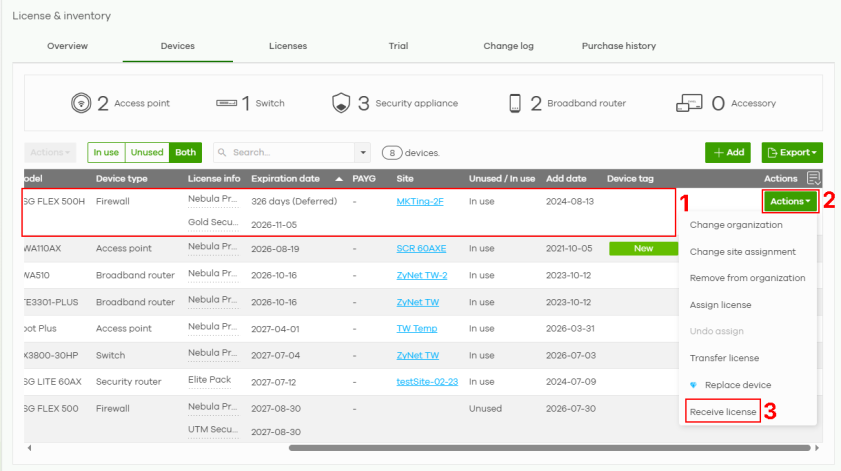
1 Go to Organization-wide > License & inventory > Devices. Locate (1) and select the USG FLEX H Series. Click Actions (2) > Receive license (3).
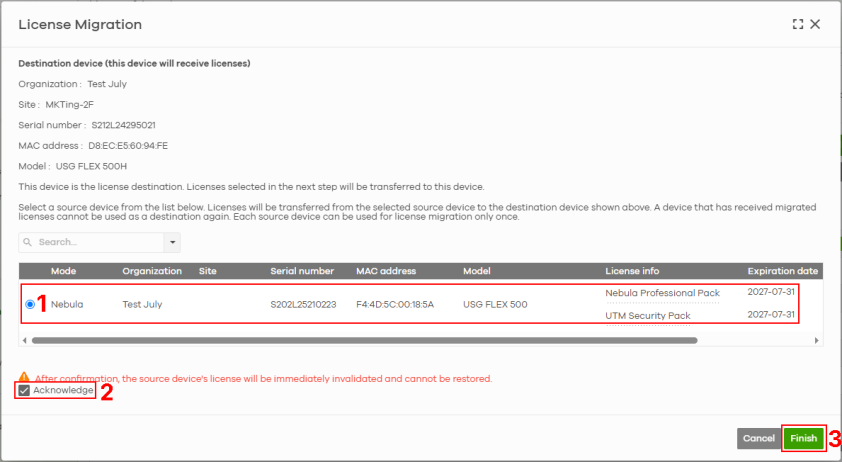
2 Select the Nebula Device of the license you want to transfer (1). Click Acknowledge (2) to confirm that the Nebula Firewalls are correct, and then click Finish (3) to exit.