Log Setting
Log Setting Overview
You can configure where the Zyxel Device sends logs and which type of logs the Zyxel Device records in the Log Setting screen.
What You Can Do in this Chapter
• Use the Log Setting screen to defines the types of logs and the log levels you want to record (Log Setting).
Log Setting
Use this screen to configure where the Zyxel Device sends logs, and which type of logs the Zyxel Device records.
If you have a server that is running a syslog service, you can also save log files to it by enabling Syslog Logging, and then entering the IP address of the server in the Syslog Server field. Select Remote to store logs on the syslog server, or select Local File to store logs on the Zyxel Device. Select Local File and Remote to store logs on both the Zyxel Device and the syslog server. To change your Zyxel Device’s log settings, click Maintenance > Log Setting. The screen appears as shown.
Maintenance > Log Setting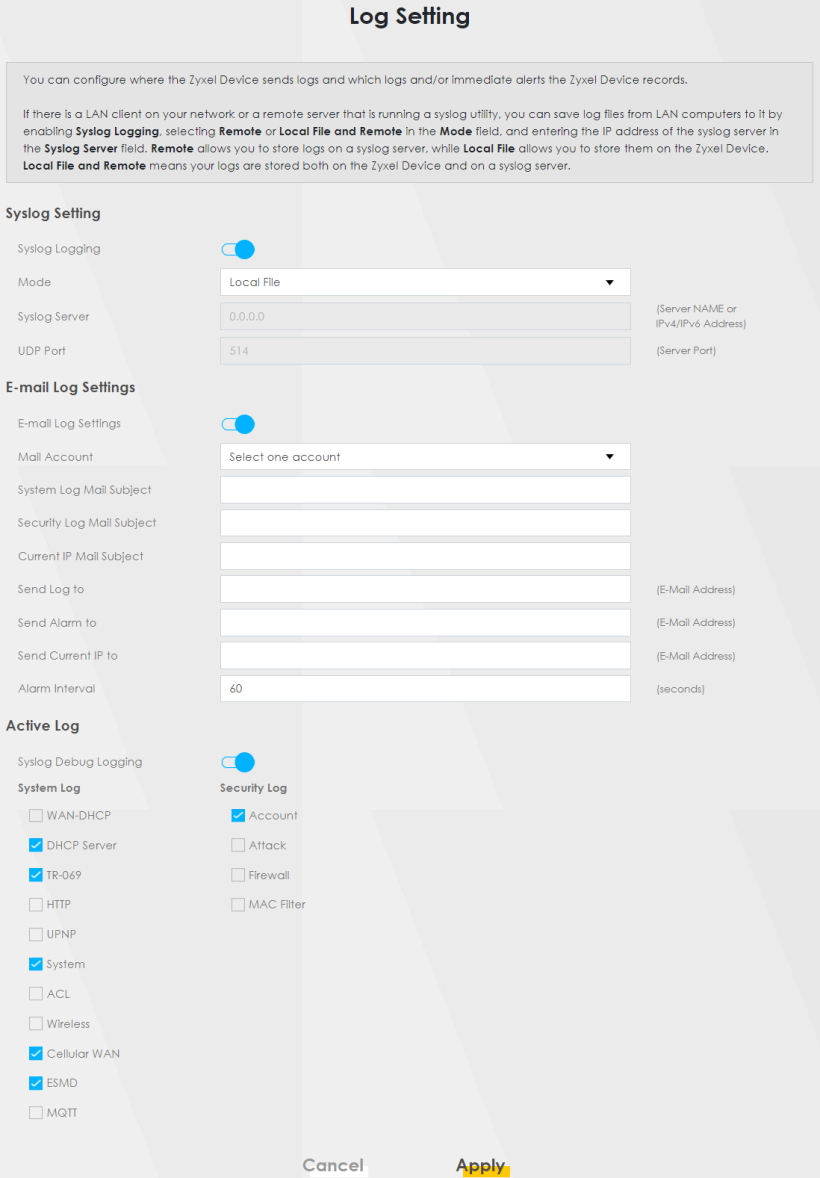
The following table describes the fields in this screen.
LABEL | Description |
|---|---|
Syslog Settings | |
Syslog Logging | Slide the switch to the right to enable syslog logging. |
Mode | Select Remote to have the Zyxel Device send the log file to an external syslog server. Select Local File to have the Zyxel Device save the log file on the Zyxel Device itself. Select Local File and Remote to have the Zyxel Device save the log file on the Zyxel Device itself and send it to an external syslog server.  A warning appears upon selecting Remote or Local File and Remote. Just click OK to continue. A warning appears upon selecting Remote or Local File and Remote. Just click OK to continue. |
Syslog Server | Enter the server name or IP address of the syslog server that will log the selected categories of logs. |
UDP Port | Enter the port number used by the syslog server. |
E-mail Log Settings | |
E-mail Log Settings | Slide the switch to the right to allow to the email address specified in Send Log to. Make sure that the Mail Server Address field is not left blank in the Maintenance > E-mail Notifications screen. |
Mail Account | Select a server specified in Maintenance > E-mail Notifications to send the logs to. |
System Log Mail Subject | This field allows you to enter a descriptive name for the system log email (for example Zyxel System Log). Up to 127 printable characters are allowed for the System Log Mail Subject including special characters inside the square brackets [!#%()*+,–./:=?@[]\{}~]. |
Security Log Mail Subject | This field allows you to enter a descriptive name for the security log email (for example Zyxel Security Log). Up to 127 printable characters are allowed for the Security Log Mail Subject including special characters inside the square brackets [!#%()*+,–./:=?@[]\{}~]. |
Send Log to | This field allows you to enter the log’s designated email recipient. The log’s format is plain text file sent as an email attachment. |
Send Alarm to | This field allows you to enter the alarm’s designated e-mail recipient. The alarm’s format is plain text file sent as an email attachment. |
Alarm Interval | Select the frequency of showing of the alarm. |
Active Log | |
System Log | Select the categories of System Logs that you want to record. |
Security Log | Select the categories of Security Logs that you want to record. |
Apply | Click Apply to save your changes. |
Cancel | Click Cancel to restore your previously saved settings. |
Example Email Log
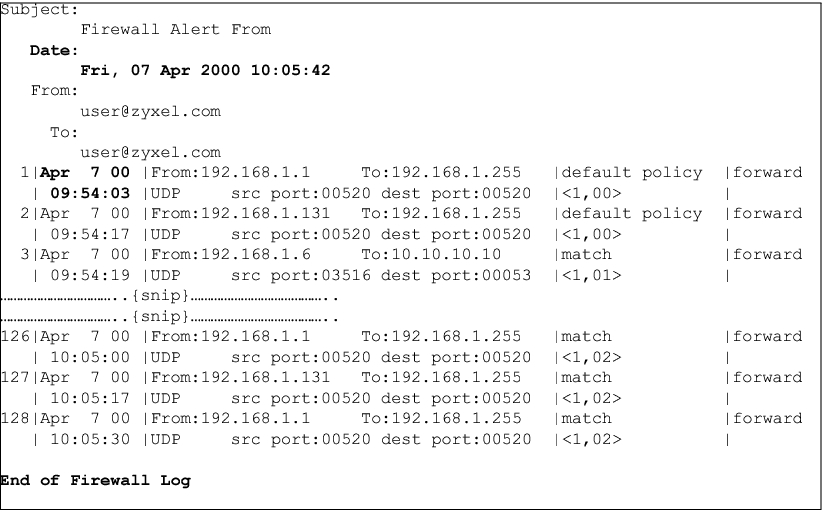
An ‘End of Log’ message displays for each mail in which a complete log has been sent. The following is an example of a log sent by email.
• You may edit the subject title.
• The date format here is Day-Month-Year.
• The date format here is Month-Day-Year. The time format is Hour-Minute-Second.
• ‘End of Log’ message shows that a complete log has been sent.
Email Log Example