Traffic Status
Traffic Status Overview
Use the Traffic Status screens to look at the network traffic status and statistics of the WAN/LAN interfaces and NAT.
What You Can Do in this Chapter
WAN Status
Click System Monitor > Traffic Status to open the WAN screen. The figures in this screen show the number of bytes received and sent through the Zyxel Device’s WAN interface. The table below shows packet statistics for each WAN interface.
System Monitor > Traffic Status > WAN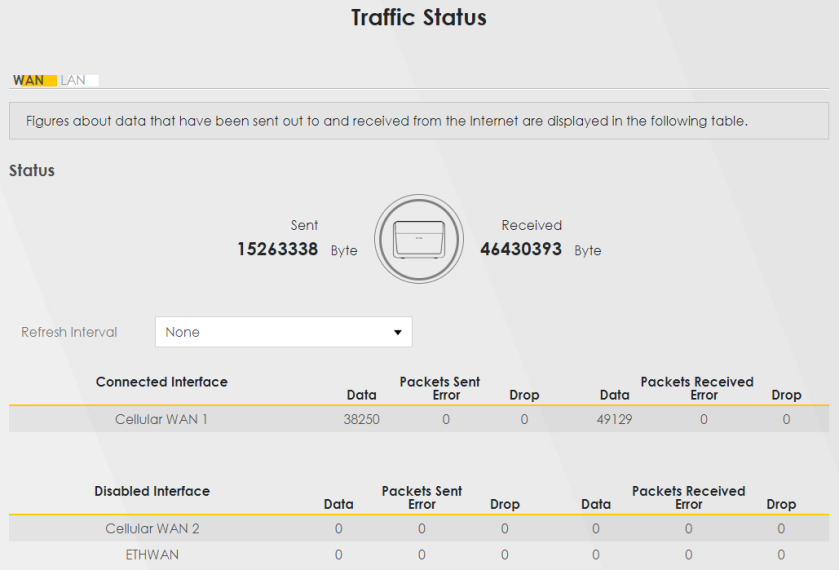
The following table describes the fields in this screen.
LABEL | Description |
|---|---|
Status | |
Refresh Interval | Select how often you want the Zyxel Device to update this screen. |
Connected Interface | This shows the name of the WAN interface that is currently connected. |
Packets Sent | |
Data | This indicates the number of transmitted packets on this interface. |
Error | This indicates the number of frames with errors transmitted on this interface. |
Drop | This indicates the number of outgoing packets dropped on this interface. |
Packets Received | |
Data | This indicates the number of received packets on this interface. |
Error | This indicates the number of frames with errors received on this interface. |
Drop | This indicates the number of received packets dropped on this interface. |
Disabled Interface | This shows the name of the WAN interface that is currently disabled. |
Packets Sent | |
Data | This indicates the number of transmitted packets on this interface. |
Error | This indicates the number of frames with errors transmitted on this interface. |
Drop | This indicates the number of outgoing packets dropped on this interface. |
Packets Received | |
Data | This indicates the number of received packets on this interface. |
Error | This indicates the number of frames with errors received on this interface. |
Drop | This indicates the number of received packets dropped on this interface. |
LAN Status
Click System Monitor > Traffic Status > LAN to open the following screen. This screen allows you to view packet statistics for each LAN or WLAN interface on the Zyxel Device.
System Monitor > Traffic Status > LAN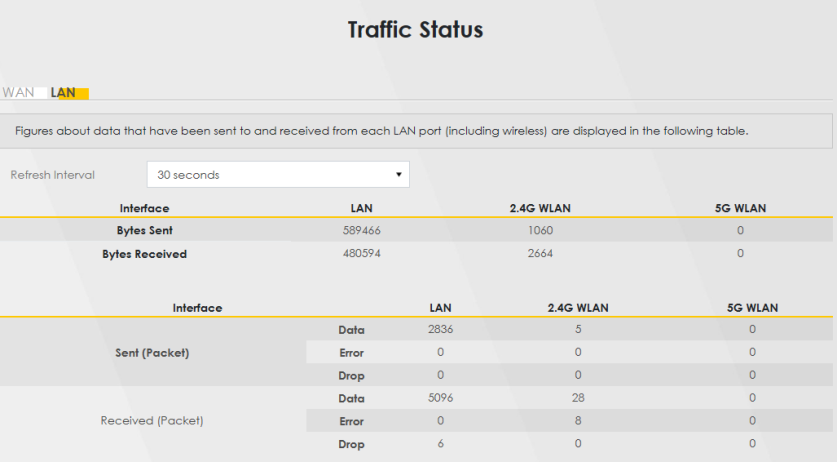
The following table describes the fields in this screen.
LABEL | Description |
|---|---|
Refresh Interval | Select how often you want the Zyxel Device to update this screen. |
Interface | This shows the LAN or WLAN interface. |
Interface | This shows the LAN or WLAN interfaces. |
Sent (Packets) | |
Data | This indicates the number of transmitted packets on this interface. |
Error | This indicates the number of frames with errors transmitted on this interface. |
Drop | This indicates the number of outgoing packets dropped on this interface. |
Received (Packets) | |
Data | This indicates the number of received packets on this interface. |
Error | This indicates the number of frames with errors received on this interface. |
Drop | This indicates the number of received packets dropped on this interface. |