WDS Profile
Overview
This chapter shows you how to configure WDS (Wireless Distribution System) profiles for the Zyxel Device to form a WDS with other APs.
What You Can Do in this Chapter
The WDS Profile screen (WDS Profile) creates preset WDS configurations that can be used by the Zyxel Device.
WDS Profile
This screen allows you to manage and create WDS profiles that can be used by the APs. To access this screen, click Configuration > Object > WDS Profile.
Configuration > Object > WDS Profile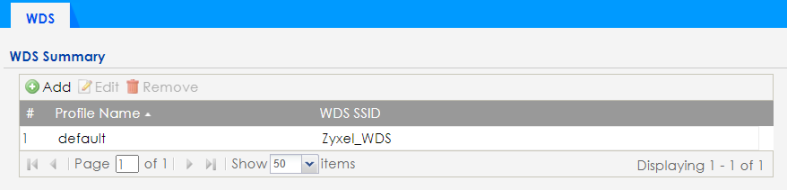
The following table describes the labels in this screen.
Label | Description |
|---|---|
Add | Click this to add a new profile. |
Edit | Click this to edit the selected profile. |
Remove | Click this to remove the selected profile. |
# | This field is a sequential value, and it is not associated with a specific profile. |
Profile Name | This field indicates the name assigned to the profile. |
WDS SSID | This field shows the SSID specified in this WDS profile. |
Add or Edit WDS Profile
This screen allows you to create a new WDS profile or edit an existing one. To access this screen, click the Add button or select an existing profile and click the Edit button.
Configuration > Object > WDS Profile > Add or Edit WDS Profile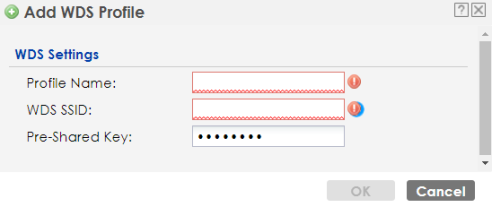
The following table describes the labels in this screen.
Label | Description |
|---|---|
Profile Name | Enter up to 31 alphanumeric characters for the profile name. |
WDS SSID | Enter the SSID with which you want the Zyxel Device to connect to a root AP or repeater to form a WDS. |
Pre-Shared Key | Enter a pre-shared key of between 8 and 63 case-sensitive ASCII characters (including spaces and symbols) or 64 hexadecimal characters. The key is used to encrypt the traffic between the APs. |
OK | Click OK to save your changes back to the Zyxel Device. |
Cancel | Click Cancel to exit this screen without saving your changes. |