ARP Table
ARP Table Overview
This chapter introduces the ARP Table.
Address Resolution Protocol (ARP) is a protocol for mapping an Internet Protocol address (IP address) to a physical machine address, also known as a Media Access Control or MAC address, on the local area network.
An IP (version 4) address is 32 bits long. In an Ethernet LAN, MAC addresses are 48 bits long. The ARP Table maintains an association between each MAC address and its corresponding IP address.
What You Can Do
Use the ARP Table screen (Viewing the ARP Table) to view IP-to-MAC address mappings.
What You Need to Know
When an incoming packet destined for a host device on a local area network arrives at the Switch, the Switch's ARP program looks in the ARP Table and if it finds the address, it sends it to the device.
If no entry is found for the IP address, ARP broadcasts the request to all the devices on the LAN. The Switch fills in its own MAC and IP address in the sender address fields, and puts the known IP address of the target in the target IP address field. In addition, the Switch puts all ones in the target MAC field (FF.FF.FF.FF.FF.FF is the Ethernet broadcast address). The replying device (which is either the IP address of the device being sought or the router that knows the way) replaces the broadcast address with the target's MAC address, swaps the sender and target pairs, and unicasts the answer directly back to the requesting machine. ARP updates the ARP Table for future reference and then sends the packet to the MAC address that replied.
Viewing the ARP Table
Use the ARP table to view IP-to-MAC address mappings and remove specific dynamic ARP entries.
Click MONITOR > ARP Table > ARP Table in the navigation panel to open the following screen.
MONITOR > ARP Table > ARP Table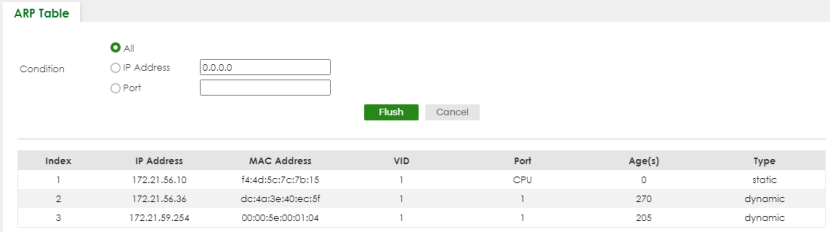
The following table describes the labels in this screen.
label | Description |
|---|---|
Condition | Specify how you want the Switch to remove ARP entries when you click Flush. Select All to remove all of the dynamic entries from the ARP table. Select IP Address and enter an IP address to remove the dynamic entries learned with the specified IP address. Select Port and enter a port number to remove the dynamic entries learned on the specified port. You can enter multiple ports separated by (no space) comma (,) or hyphen (-) for a range. For example, enter “3-5” for ports 3, 4, and 5. Enter “3,5,7” for ports 3, 5, and 7. |
Flush | Click Flush to remove the ARP entries according to the condition you specified. |
Cancel | Click Cancel to return the fields to the factory defaults. |
Index | This is the ARP table entry number. |
IP Address | This is the IP address of a device connected to a Switch port with the corresponding MAC address below. |
MAC Address | This is the MAC address of the device with the corresponding IP address above. |
VID | This field displays the VLAN to which the device belongs. |
Port | This field displays the port to which the device connects. CPU means this IP address is the Switch’s management IP address. |
Age(s) | This field displays how long (in seconds) an entry can still remain in the ARP table before it ages out and needs to be relearned. This shows 0 for a static entry. |
Type | This shows whether the IP address is dynamic (learned by the Switch) or static (manually configured in SYSTEM > IP Setup > IP Setup or NETWORKING > ARP Setup > Static ARP). |