MAC Table
MAC Table Overview
This chapter introduces the MAC Table screen.
The MAC Table screen (a MAC table is also known as a filtering database) shows how frames are forwarded or filtered across the Switch’s ports. It shows what device MAC address, belonging to what VLAN group (if any) is forwarded to which ports and whether the MAC address is dynamic (learned by the Switch) or static (manually entered in the SWITCHING > Static MAC Forwarding > Static MAC Forwarding screen).
What You Can Do
Use the MAC Table screen (Viewing the MAC Table) to check whether the MAC address is dynamic or static.
What You Need to Know
The Switch uses the MAC Table to determine how to forward frames. See the following figure.
1 The Switch examines a received frame and learns the port on which this source MAC address came.
2 The Switch checks to see if the frame's destination MAC address matches a source MAC address already learned in the MAC Table.
• If the Switch has already learned the port for this MAC address, then it forwards the frame to that port.
• If the Switch has not already learned the port for this MAC address, then the frame is flooded to all ports. Too much port flooding leads to network congestion, then the Switch sends an ARP to request the MAC address. The Switch then learns the port that replies with the MAC address.
• If the Switch has already learned the port for this MAC address, but the destination port is the same as the port it came in on, then it filters the frame.
MAC Table Flowchart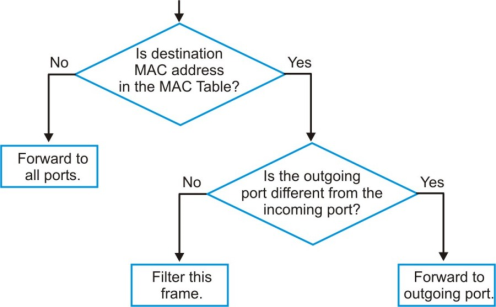
Viewing the MAC Table
Use this screen to search specific MAC addresses. You can also directly add dynamic MAC addresses into the static MAC forwarding table or MAC filtering table from the MAC table using this screen.
Click MONITOR > MAC Table > MAC Table in the navigation panel to display the following screen.
MONITOR > MAC Table > MAC Table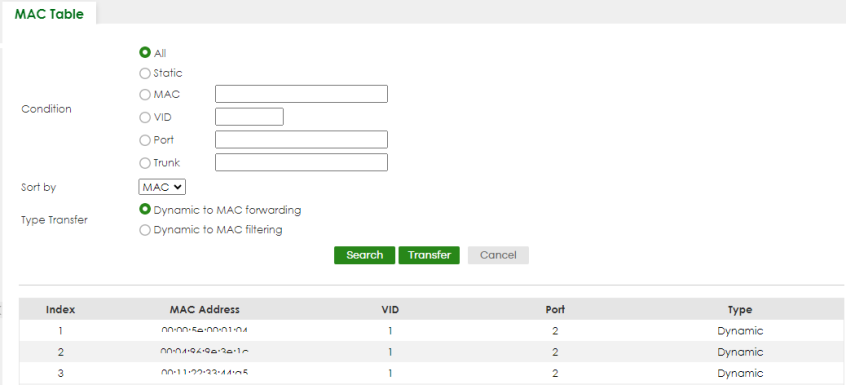
The following table describes the labels in this screen.
label | Description |
|---|---|
Condition | Select one of the below search conditions and click Search to only display the data which matches the criteria you specified. Select All to display any entry in the MAC table of the Switch. Select Static to display the MAC entries manually configured on the Switch. Select MAC and enter a MAC address in the field provided to display a specified MAC entry. Select VID and enter a VLAN ID in the field provided to display the MAC entries belonging to the specified VLAN. Select Port and enter a port number in the field provided to display the MAC addresses which are forwarded on the specified port. Select Trunk and type the ID of a trunk group to display all MAC addresses learned from the ports in the trunk group. |
Sort by | Define how the Switch displays and arranges the data in the summary table below. Select MAC to display and arrange the data according to MAC address. Select VID to display and arrange the data according to VLAN group. Select PORT to display and arrange the data according to port number. |
Type Transfer | Select Dynamic to MAC forwarding and click the Transfer button to change all dynamically learned MAC address entries in the summary table below into static entries. They also display in the SWITCHING > Static MAC Forwarding > Static MAC Forwarding screen. Select Dynamic to MAC filtering and click the Transfer button to change all dynamically learned MAC address entries in the summary table below into MAC filtering entries. These entries will then display only in the SWITCHING > Static MAC Filtering > Static MAC Filtering screen and the default filtering action is Discard source. |
Search | Click this to search data in the MAC table according to your input criteria. |
Transfer | Click this to perform the MAC address transferring you selected in the Type Transfer field. |
Cancel | Click Cancel to change the fields back to their last saved values. |
Index | This is the incoming frame index number. |
MAC Address | This is the MAC address of the device from which this incoming frame came. |
VID | This is the VLAN group to which this frame belongs. |
Port | This is the port where the above MAC address is forwarded. |
Type | This shows whether the MAC address is Dynamic (learned by the Switch) or Static (manually entered in the SWITCHING > Static MAC Forwarding > Static MAC Forwarding screen). |