Routing Table
Routing Table Overview
This chapter introduces the IPv4/IPv6 routing tables.
The IPv4/IPv6 routing tables record routing information of the best path to destinations where packets were forwarded. Use this table to check information like routing destination, gateway, interface IP addresses, hop count, and routing methods.
What You Can Do
Use the IPv4 Routing Table screen (IPv4 Routing Table) to view the Switch’s IPv4 routing table information.
Use the IPv6 Routing Table screen (IPv6 Routing Table) to view the Switch’s IPv6 routing table information.
IPv4 Routing Table
Use this screen to view IPv4 routing table information. Click MONITOR > Routing Table > IPv4 Routing Table in the navigation panel to display the screen as shown.
MONITOR > Routing Table > IPv4 Routing Table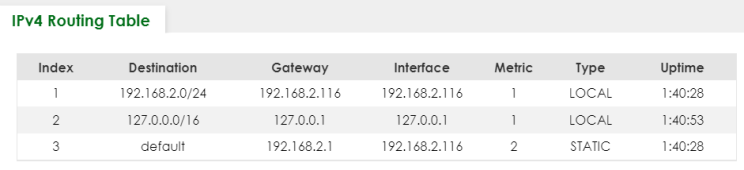
The following table describes the labels in this screen.
label | description |
|---|---|
Index | This field displays the index number. |
Destination | This field displays the destination IP routing domain. |
Gateway | This field displays the IP address of the gateway device. |
Interface | This field displays the IP address of the IPv4 Interface. |
Metric | This field displays the cost of the route. |
Type | This field displays the method used to learn the route. STATIC – added as a static entry. LOCAL – added as a local interface entry. |
Uptime | This field displays how long the route has been running since the Switch learned the route and added an entry in the routing table. |
IPv6 Routing Table
Use this screen to view IPv6 routing table information. Click MONITOR > Routing Table > IPv6 Routing Table in the navigation panel to display the screen as shown.
MONITOR > Routing Table > IPv6 Routing Table
The following table describes the labels in this screen.
label | description |
|---|---|
Index | This field displays the index number. |
Route Destination/Prefix Length | This field displays the IPv6 subnet prefix and prefix length of the final destination. |
Next Hop | This field displays the IPv6 address of the gateway that helps forward the packet to the destination. |
Interface | This field displays the descriptive name of the IPv6 interface that is used to forward the packets to the destination. |
Metric | This field displays the cost of the route. |
Type | This field displays the method used to learn the route. STATIC – added as a static entry. Connect – added as a local interface entry. |