System Information
What You Can Do
Use the System Information screen (System Information) to view general system information and hardware status of the Switch.
System Information
In the navigation panel, click MONITOR > System Information > System Information to display the screen as shown. Use this screen to view general system information.
MONITOR > System Information > System Information (Standalone Mode)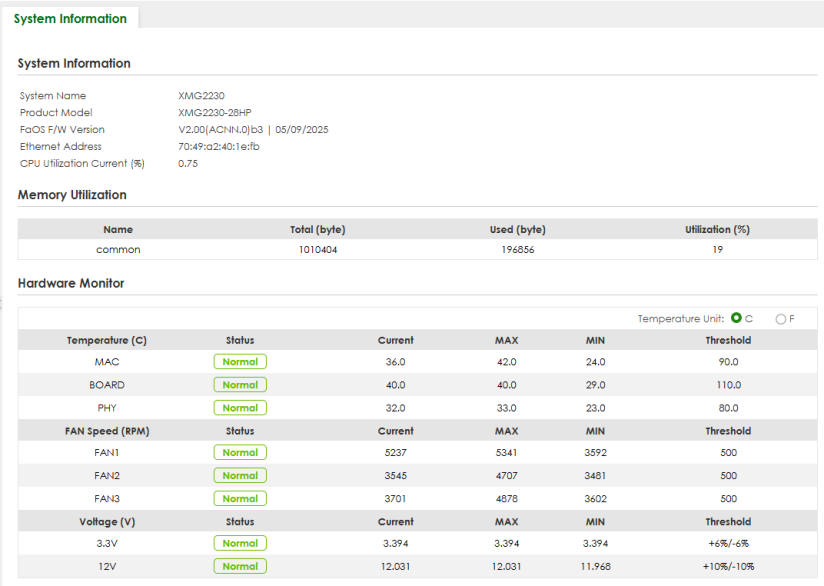
The following table describes the labels in this screen.
label | description |
|---|---|
System Information | |
System Name | This displays the descriptive name of the Switch for identification purposes. |
Product Model | This displays the product model of the Switch. Use this information when searching for firmware upgrade or looking for other support information in the website. |
FaOS F/W Version | This displays the version number of the Switch 's current firmware including the date created. |
Ethernet Address | This refers to the Ethernet MAC (Media Access Control) address of the Switch. |
CPU Utilization Current (%) | This displays the current percentage of CPU utilization. |
Memory Utilization Memory utilization shows how much DRAM memory is available and in use. It also displays the current percentage of memory utilization. | |
Name | This displays the name of the memory pool. |
Total (byte) | This displays the total number of bytes in this memory pool. |
Used (byte) | This displays the number of bytes being used in this memory pool. |
Utilization (%) | This displays the percentage (%) of memory being used in this memory pool. |
Hardware Monitor | |
Temperature Unit | The Switch has temperature sensors that are capable of detecting and reporting if the temperature rises above the threshold. You may choose the temperature unit (Centigrade or Fahrenheit) in this field. |
Temperature (C/F) | MAC, BOARD, and PHY refer to the location of the temperature sensor on the Switch printed circuit board. |
Status | This field displays Normal for temperatures below the threshold and Error for those above. |
Current | This shows the current temperature at this sensor. |
MAX | This field displays the maximum temperature measured at this sensor. |
MIN | This field displays the minimum temperature measured at this sensor. |
Threshold | This field displays the upper temperature limit at this sensor. |
Fan Speed (RPM) | A properly functioning fan is an essential component (along with a sufficiently ventilated, cool operating environment) in order for the device to stay within the temperature threshold. Each fan has a sensor that is capable of detecting and reporting if the fan speed falls below the threshold shown. |
Status | Normal indicates that this fan is functioning above the minimum speed. Error indicates that this fan is functioning below the minimum speed. |
Current | This field displays this fan's current speed in Revolutions Per Minute (RPM). |
MAX | This field displays this fan's maximum speed measured in Revolutions Per Minute (RPM). |
MIN | This field displays this fan's minimum speed measured in Revolutions Per Minute (RPM). "<41" is displayed for speeds too small to measure (under 2000 RPM). |
Threshold | This field displays the minimum speed at which a normal fan should work. |
Voltage(V) | The power supply for each voltage has a sensor that is capable of detecting and reporting if the voltage falls out of the tolerance range. |
Status | Normal indicates that the voltage is within an acceptable operating range at this point; otherwise Error is displayed. |
Current | This is the current voltage reading. |
MAX | This field displays the maximum voltage measured at this point. |
MIN | This field displays the minimum voltage measured at this point. |
Threshold | This field displays the percentage tolerance of the voltage with which the Switch still works. |