Link Aggregation
Link Aggregation Overview
This chapter shows you how to logically aggregate physical links to form one logical, higher-bandwidth link.
Link aggregation (trunking) is the grouping of physical ports into one logical higher-capacity link. You may want to trunk ports if for example, it is cheaper to use multiple lower-speed links than to under-utilize a high-speed, but more costly, single-port link. However, the more ports you aggregate then the fewer available ports you have. A trunk group is one logical link containing multiple ports.
The beginning port of each trunk group must be physically connected to form a trunk group.
What You Can Do
• Use the Link Aggregation Status screen (Link Aggregation Status) to view ports you have configured to be in the trunk group, ports that are currently transmitting data as one logical link in the trunk group and so on.
• Use the Link Aggregation Setting screen (Link Aggregation Setting) to configure static link aggregation.
• Use the Link Aggregation Control Protocol screen (Link Aggregation Control Protocol) to enable Link Aggregation Control Protocol (LACP).
What You Need to Know
The Switch supports both static and dynamic link aggregation.
 In a properly planned network, it is recommended to implement static link aggregation only. This ensures increased network stability and control over the trunk groups on your Switch.
See Static Trunking Example for a static port trunking example.
Dynamic Link Aggregation
The Switch adheres to the IEEE 802.3ad standard for static and dynamic (LACP) port trunking.
The IEEE 802.3ad standard describes the Link Aggregation Control Protocol (LACP) for dynamically creating and managing trunk groups.
When you enable LACP link aggregation on a port, the port can automatically negotiate with the ports at the remote end of a link to establish trunk groups. LACP also allows port redundancy, that is, if an operational port fails, then one of the “standby” ports become operational without user intervention. Please note that:
• You must connect all ports point-to-point to the same Ethernet switch and configure the ports for LACP trunking.
• LACP only works on full-duplex links.
• All ports in the same trunk group must have the same media type, speed, duplex mode and flow control settings.
Configure trunk groups or LACP before you connect the Ethernet switch to avoid causing network topology loops.
Link Aggregation ID
LACP aggregation ID consists of the following information1:
System Priority | MAC address | key | port priority | port number |
|---|---|---|---|---|
0000 | 00-00-00-00-00-00 | 0000 | 00 | 0000 |
System Priority | MAC address | key | port priority | port number |
|---|---|---|---|---|
0000 | 00-00-00-00-00-00 | 0000 | 00 | 0000 |
Traffic Distribution Criteria
The Switch supports both unicast and non-unicast traffic (broadcast and multicast) network load sharing over link aggregation. Load sharing works by statically splitting the traffic based on source or destination IP/MAC address, and then distributing the load across multiple paths. In link aggregation, this allows the trunk group (ports) to transmit data as one logical link to a single or group of hosts on the network.
Unicast and non-unicast traffic network load sharing over link aggregation (trunking) is enabled by default.
Algorithm Types Limitation
The maximum number of link aggregation algorithm types (Criteria) that can link up at the same time depends on your Switch model. See PORT > Link Aggregation > Link Aggregation Status for the list of Criteria that your Switch currently supports.
The following table shows the maximum number of link aggregation algorithm types that can link up at the same time.
model | link aggregation algorithm types (maximum) |
|---|---|
XMG2230 Series | 2 |
For example, if your Switch has two link aggregation algorithm types that are currently online. The third link aggregation algorithm type can only go online when one of the online link aggregation algorithm type goes offline.
Link Aggregation Status
Click PORT > Link Aggregation > Link Aggregation Status in the navigation panel to display the screen as shown. See Link Aggregation Overview for more information.
PORT > Link Aggregation > Link Aggregation Status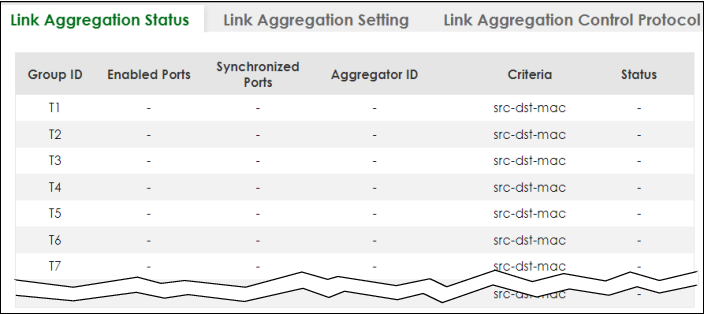
The following table describes the labels in this screen.
LABEL | DESCRIPTION |
|---|---|
Group ID | This field displays the group ID to identify a trunk group, that is, one logical link containing multiple ports. |
Enabled Ports | These are the ports you have configured in the Link Aggregation Setting screen to be in the trunk group. The port numbers displays only when this trunk group is activated and there is a port belonging to this group. |
Synchronized Ports | These are the ports that are currently transmitting data as one logical link in this trunk group. |
Aggregator ID | Link Aggregator ID consists of the following: system priority, MAC address, key, port priority and port number. The ID displays only when there is a port belonging to this trunk group and LACP is also enabled for this group. |
Criteria | This shows the outgoing traffic distribution algorithm types used in this trunk group. Sending of packets are from the same source and/or to the same destination over the same link within the trunk. src-mac means the Switch distributes traffic based on the packet’s source MAC address. dst-mac means the Switch distributes traffic based on the packet’s destination MAC address. src-dst-mac means the Switch distributes traffic based on a combination of the packet’s source and destination MAC addresses. src-ip means the Switch distributes traffic based on the packet’s source IP address. dst-ip means the Switch distributes traffic based on the packet’s destination IP address. src-dst-ip means the Switch distributes traffic based on a combination of the packet’s source and destination IP addresses. To find the number of link aggregation algorithm types that can link up at the same time, see Algorithm Types Limitation . |
Status | This field displays how these ports were added to the trunk group. It displays: • Static – if the ports are configured as static members of a trunk group. • LACP – if the ports are configured to join a trunk group through LACP. |
Link Aggregation Setting
Click PORT > Link Aggregation > Link Aggregation Setting to display the screen shown next. See Link Aggregation Overview for more information on link aggregation.
PORT > Link Aggregation > Link Aggregation Setting (Standalone Mode)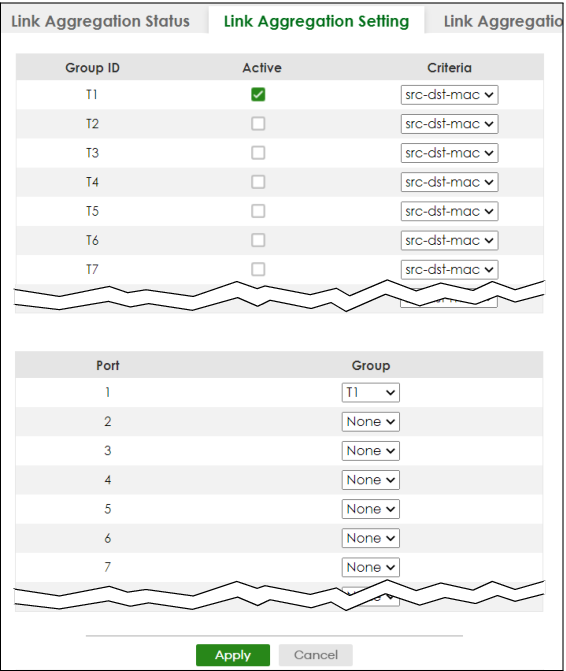
The following table describes the labels in this screen.
LABEL | DESCRIPTION |
|---|---|
This is the only screen you need to configure to enable static link aggregation. | |
Group ID | The field identifies the link aggregation group, that is, one logical link containing multiple ports. |
Active | Select this to activate a trunk group. |
Criteria | Select the outgoing traffic distribution type. Packets from the same source and/or to the same destination are sent over the same link within the trunk. By default, the Switch uses the src-dst-mac distribution type. If the Switch is behind a router, the packet’s destination or source MAC address will be changed. In this case, set the Switch to distribute traffic based on its IP address to make sure port trunking can work properly. Select src-mac to distribute traffic based on the packet’s source MAC address. Select dst-mac to distribute traffic based on the packet’s destination MAC address. Select src-dst-mac to distribute traffic based on a combination of the packet’s source and destination MAC addresses. Select src-ip to distribute traffic based on the packet’s source IP address. Select dst-ip to distribute traffic based on the packet’s destination IP address. Select src-dst-ip to distribute traffic based on a combination of the packet’s source and destination IP addresses. |
Port | This field displays the port number. |
Group | Select the trunk group to which a port belongs. When you enable the port security feature on the Switch and configure port security settings for a port, you cannot include the port in an active trunk group. |
Apply | Click Apply to save your changes to the Switch’s run-time memory. The Switch loses these changes if it is turned off or loses power, so use the Save link on the top navigation panel to save your changes to the non-volatile memory when you are done configuring. |
Cancel | Click Cancel to begin configuring this screen afresh. |
Link Aggregation Control Protocol
Click PORT > Link Aggregation > Link Aggregation Control Protocol to display the screen shown next. See Dynamic Link Aggregation for more information on dynamic link aggregation.
Do NOT configure this screen unless you want to enable dynamic link aggregation.PORT > Link Aggregation > Link Aggregation Control Protocol (Standalone Mode)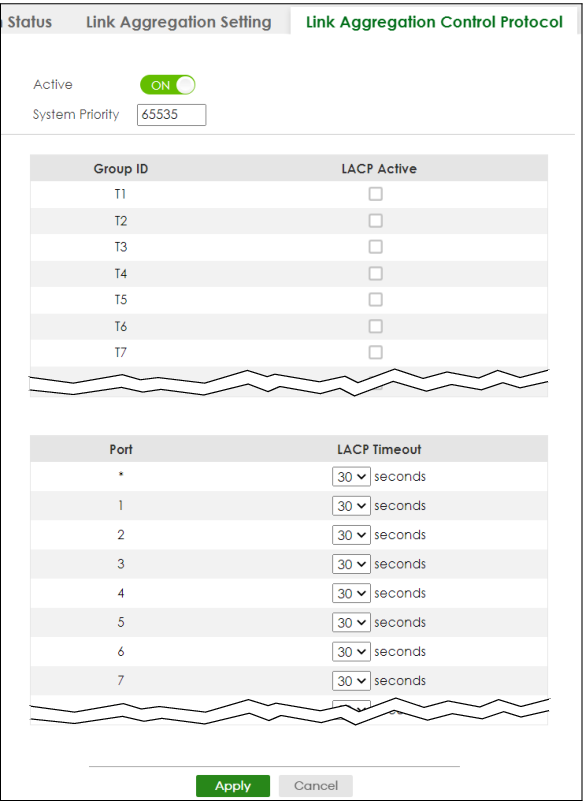
The following table describes the labels in this screen.
LABEL | DESCRIPTION |
|---|---|
Active | Enable the switch button to enable Link Aggregation Control Protocol (LACP). |
System Priority | LACP system priority is a number between 1 and 65535. The switch with the lowest system priority (and lowest port number if system priority is the same) becomes the LACP “server”. The LACP “server” controls the operation of LACP setup. Enter a number to set the priority of an active port using Link Aggregation Control Protocol (LACP). The smaller the number, the higher the priority level. |
Use this section to enable LACP on trunks. | |
Group ID | The field identifies the link aggregation group, that is, one logical link containing multiple ports. |
LACP Active | Select this option to enable LACP for a trunk. |
Use this section to configure LACP timeout on ports. | |
Port | This field displays the port number. |
* | Settings in this row apply to all ports. Use this row only if you want to make some settings the same for all ports. Use this row first to set the common settings and then make adjustments on a port-by-port basis. Changes in this row are copied to all the ports as soon as you make them. |
LACP Timeout | Timeout is the time interval between the individual port exchanges of LACP packets in order to check that the peer port in the trunk group is still up. If a port does not respond after three tries, then it is deemed to be “down” and is removed from the trunk. Set a short timeout (1 second) for busy trunked links to ensure that disabled ports are removed from the trunk group as soon as possible. Select either 1 second or 30 seconds. |
Apply | Click Apply to save your changes to the Switch’s run-time memory. The Switch loses these changes if it is turned off or loses power, so use the Save link on the top navigation panel to save your changes to the non-volatile memory when you are done configuring. |
Cancel | Click Cancel to begin configuring this screen afresh. |
Technical Reference
This section provides technical background information on the topics discussed in this chapter.
Static Trunking Example
This example shows you how to create a static port trunk group for ports 2 – 5.
1 Make your physical connections – make sure that the ports that you want to belong to the trunk group are connected to the same destination. The following figure shows ports 2 – 5 on switch A connected to switch B.
Trunking Example – Physical Connections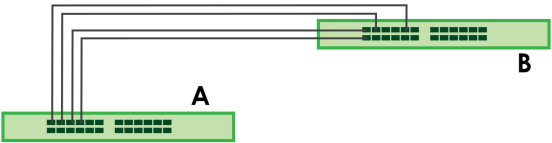
2 Configure static trunking – Click PORT > Link Aggregation > Link Aggregation Setting. In this screen activate trunk group T1, select the traffic distribution algorithm used by this group and select the ports that should belong to this group as shown in the figure below. Click Apply when you are done.
Trunking Example – Configuration Screen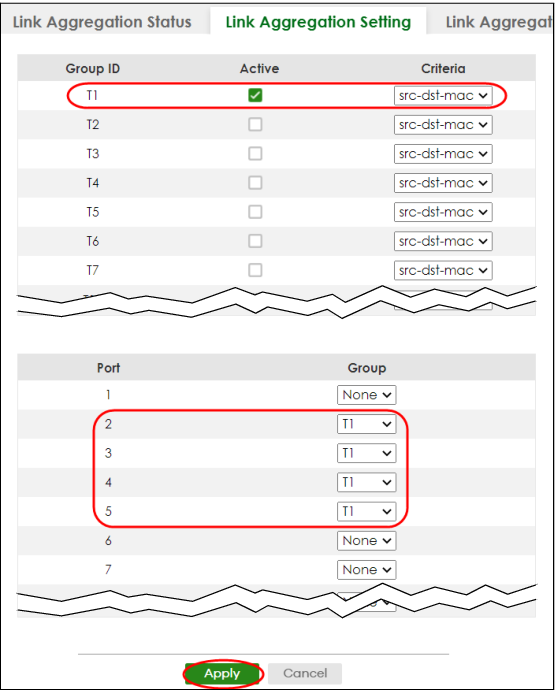
Your trunk group 1 (T1) configuration is now complete.
1 Port Priority and Port Number are 0 as it is the aggregator ID for the trunk group, not the individual port.