ZULD
ZULD Overview
A unidirectional link is a connection where the link is up on both ends, but only one end can receive packets. This may happen if OAM was initially enabled but then disabled, there are mis-configured transmitting or receiving lines or the hardware is malfunctioning. Zyxel Unidirectional Link Detection (ZULD) is a layer-2 protocol that can detect and disable these physical one-way links before they cause loops or communication malfunction.
In the figure below, S1–A is a bidirectional link as both ends can send packets to each other. S1–B is unidirectional as B cannot send packets to S1 (although the S1–B link is up). Similarly, S2–S1 is unidirectional as S1 cannot send packets to S2 (although the S1–S2 link is up).
ZULD Overview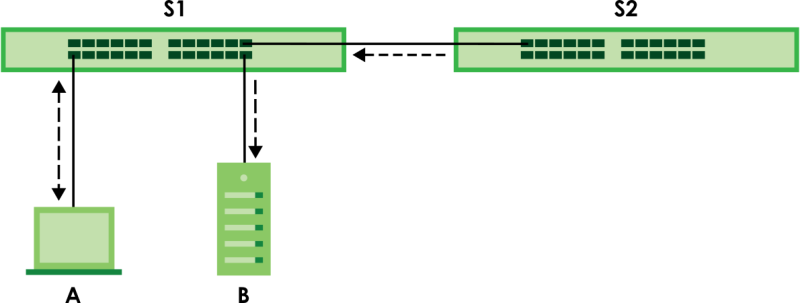
What You Can Do
• Use the ZULD Setup screen (ZULD Setup) to enable ZULD on a port, configure a mode and set the probe time.
What You Need to Know
• ZULD must be enabled on the Switch and the ports in order to detect unidirectional links by monitoring OAMPDUs.
• Ports advertise their unidirectional link detection capability using OAMPDUs, so all connected devices must support OAM as well as ZULD. You need to enable OAM on the Switch by going to PORT > OAM > OAM Setup and enable the switch in the Active field. OAM must be enabled on other connected devices too. If OAM is not enabled initially, ZULD will not work.
• If OAM is enabled initially and later disabled on one end of a link, the link will be unidirectional as that end cannot send OAMPDUs.
• OAM discovery, the sending of OAMPDUs to other ports, is initiated by an active port.
• When ZULD detects a unidirectional link, it sends a syslog and SNMP trap and may shut down the affected port (Aggressive Mode).
• If a port on the Switch is shut down by ZULD, and you want to recover it, then do one of the following:
• Go to PORT > Port Setup > Port Setup. Clear Active and click Apply. Then select Active and click Apply again.
• Go to SECURITY > Errdisable > Errdisable Recovery and set the interval for ZULD. After the interval expires, the closed ports will become active and start receiving packets again.
• Use the command port no inactive.
• Refer to the ZULD logs to see when a unidirectional link is detected and when it is recovered to a bidirectional link.
ZULD Status
Use this screen to see details of unidirectional and bidirectional links discovered by ZULD. To open this screen, click PORT > ZULD > ZULD Status.
PORT > ZULD > ZULD Status (Standalone Mode)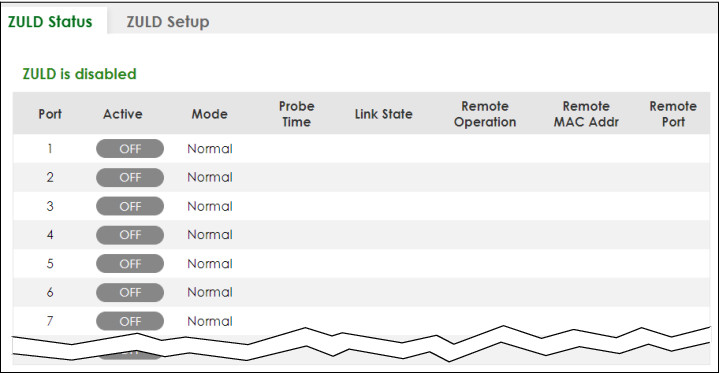
The following table describes the fields in the above screen.
label | description |
|---|---|
ZULD is.... | This shows whether ZULD is enabled or disabled on the Switch. |
Port | This field displays the port number. |
Active | This field displays whether ZULD is enabled on the port or not. ZULD must be enabled to detect an unidirectional link by monitoring OAMPDUs. |
Mode | This field indicates what ZULD will do when a unidirectional link is detected. In Normal mode, ZULD only sends a syslog and trap when it detects a unidirectional link. In Aggressive mode, ZULD shuts down the port (puts it into an ErrDisable state) as well as sends a syslog and trap when it detects a unidirectional link. |
Probe Time | Probe time is the length of time that ZULD waits before declaring that a link is unidirectional. When the probe time expires, and one port (either on the Switch or the connected device) still has not received an OAMPDU, then ZULD declares that the link is unidirectional. |
Link State | This field shows the following link states: • Linkdown: This is an initialization state, where the port is not yet up. • Probe: This indicates that ZULD is discovering the connected device on this link. • Bidirectional: Traffic sent by the Switch is received by the connected device on this link, and traffic from the connected device on this link is received by the Switch. • Unidirectional: The state of the link between the port and its connected port cannot be determined either because no ZULD message was received, or one port is not capable of sending traffic. • Shutdown: The port has been shut down because its link with the connected device is unidirectional and ZULD is in Aggressive mode. |
Remote Operation | This field displays whether ZULD is enabled or disabled on the connected device on this link. ZULD must be enabled on the connected device and on the port that is connecting to the Switch. |
Remote MAC Addr | This is the MAC address of the port on the connected device to which the port of the Switch is connected. |
Remote Port | This is the port number of the port on the connected device to which the port of the Switch is connected. |
ZULD Setup
Use this screen to enable ZULD on a port, configure a mode and set the probe time. To open this screen, click PORT > ZULD > ZULD Setup.
PORT > ZULD > ZULD Setup (Standalone Mode)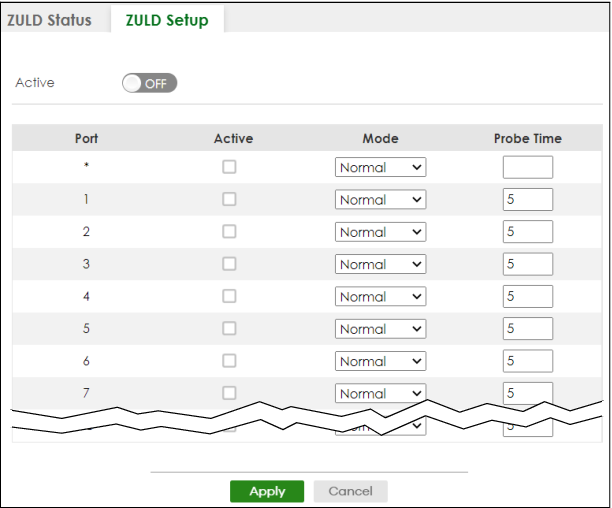
The following table describes the fields in the above screen.
label | description |
|---|---|
Active | Enable the switch button to enable ZULD on the Switch. |
Port | This field displays the port number. |
* | Settings in this row apply to all ports. Use this row only if you want to make some settings the same for all ports. Use this row first to set the common settings and then make adjustments on a port-by-port basis.  Changes in this row are copied to all the ports as soon as you make them. Changes in this row are copied to all the ports as soon as you make them. |
Active | Select this to enable ZULD on the port. ZULD must be enabled to detect an unidirectional link by monitoring OAMPDUs. |
Mode | Select Normal or Aggressive. In Normal mode, ZULD only sends a syslog and trap when it detects a unidirectional link. In Aggressive mode, ZULD shuts down the port (puts it into an ErrDisable state) as well as sends a syslog and trap when it detects a unidirectional link. |
Probe Time | Type the length of time that ZULD waits before declaring that a link is unidirectional. When the probe time expires, and one port (either on the Switch or the connected device) still has not received an OAMPDU, then ZULD declares that the link is unidirectional. The allowed time range is from 5 – 65535 seconds. |
Apply | Click Apply to save your changes to the Switch’s run-time memory. The Switch loses these changes if it is turned off or loses power, so use the Save link on the top navigation panel to save your changes to the non-volatile memory when you are done configuring. |
Cancel | Click this to reset the values in this screen to their last-saved values. |