IP Source Guard
IP Source Guard Overview
IP source guard consists of the following features:
• DHCP snooping. Use this to filter unauthorized DHCP server packets on the network and to build a binding table dynamically.
• ARP inspection. Use this to filter unauthorized ARP packets on the network.
• Static IP bindings. Use this to create static bindings in the binding table.
The Switch builds the binding table by snooping DHCP packets (dynamic bindings) and from information provided manually by administrators (static bindings).
Binding Table
IP source guard uses a binding table to distinguish between authorized and unauthorized ARP packets in your network. A binding contains these key attributes:
• MAC address
• VLAN ID
• IP address
• Port number
The Switch builds the binding table by snooping DHCP packets (dynamic bindings) and from information provided manually by administrators (static bindings).
DHCP Snooping
The Switch only allows an authorized DHCP server on a trusted port to assign IP addresses. Unauthorized DHCP servers will not be able to assign IP addresses to network clients. When the Switch receives a DHCP server packet from an authorized DHCP server, it inspects the packet and records the DHCP information in a binding table. The binding records are used in ARP inspection to filter unauthorized ARP packets. See DHCP Snooping Overview for more DHCP snooping information.
ARP Inspection
When the Switch receives an ARP packet, it looks up the appropriate MAC address, VLAN ID, IP address, and port number in the binding table. If there is a binding, the Switch forwards the packet. Otherwise, the Switch discards the packet.
If you want to use dynamic bindings to filter unauthorized ARP packets (typical implementation), you have to enable DHCP snooping before you enable ARP inspection.
The following figure demonstrates a scenario with DHCP snooping and ARP inspection enabled. In this scenario, we connect an authorized DHCP server (A) and the client devices on the ARP trusted ports (T). A client device (B) is assigned the IP address 192.168.1.56 by the authorized DHCP server (A). A malicious host (C) on an untrusted port (UT) puts a wrong MAC address with the IP address 192.168.1.56 in an ARP reply packet pretending to be client device (B) (192.168.1.56). The Switch snoops DHCP packets sent from the authorized DHCP server (A) and creates bindings in the binding table. When the Switch receives ARP packets from an untrusted port (UT), it compares the IP and MAC addresses with the existing bindings. Since the IP and MAC binding is different from the existing bindings, the Switch blocks the unauthorized ARP packets sent from the malicious host (C). The malicious host (C) therefore cannot disguise as client device (B) to build connections with other client devices on your network.
IP Source Guard Example Application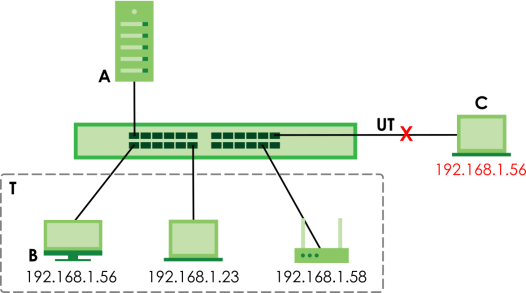
What You Can Do
• Use the IP Source Guard screen (IPv4 Source Guard) to look at the current bindings for DHCP snooping and ARP inspection.
• Use the Static Binding screen (IPv4 Source Guard Static Binding) to manage static bindings for DHCP snooping and ARP inspection.
IPv4 Source Guard
Use this screen to look at the current bindings for DHCP snooping and ARP inspection. Bindings are used by ARP inspection to distinguish between authorized and unauthorized ARP packets in the network. The Switch learns the bindings by snooping DHCP packets (dynamic bindings) and from information provided manually by administrators (static bindings). To open this screen, click SECURITY > IPv4 Source Guard > IP Source Guard > IP Source Guard.
SECURITY > IPv4 Source Guard > IP Source Guard > IP Source Guard
The following table describes the labels in this screen.
label | description |
|---|---|
Index | This field displays a sequential number for each binding. |
IP Address | This field displays the IP address assigned to the MAC address in the binding. |
VID | This field displays the source VLAN ID in the binding. |
MAC Address | This field displays the source MAC address in the binding. |
Port | This field displays the port number in the binding. If this field is blank, the binding applies to all ports. |
Lease | This field displays how many days, hours, minutes, and seconds the binding is valid; for example, 2d3h4m5s means the binding is still valid for 2 days, 3 hours, 4 minutes, and 5 seconds. This field displays infinity if the binding is always valid (for example, a static binding). |
Type | This field displays how the Switch learned the binding. static: This binding was learned from information provided manually by an administrator. dhcp-snooping: This binding was learned by snooping DHCP packets. |
IPv4 Source Guard Static Binding
Use this screen to manage static bindings for DHCP snooping and ARP inspection. Static bindings are uniquely identified by the MAC address and VLAN ID. Each MAC address and VLAN ID can only be in one static binding. If you try to create a static binding with the same MAC address and VLAN ID as an existing static binding, the new static binding replaces the original one. To open this screen, click SECURITY > IPv4 Source Guard > IP Source Guard > Static Binding.
SECURITY > IPv4 Source Guard > IP Source Guard > Static Binding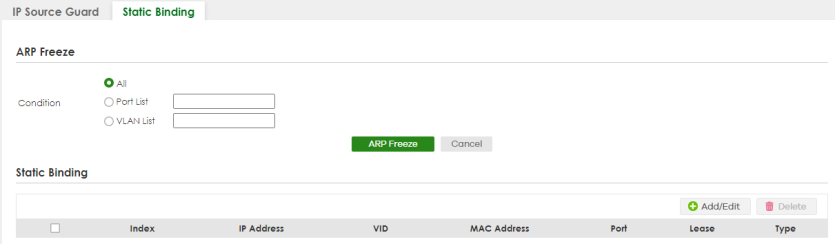
The following table describes the labels in this screen.
label | description |
|---|---|
ARP Freeze ARP Freeze allows you to automatically create static bindings from the current ARP entries (either dynamically learned or static ARP entries) until the Switch’s binding table is full.  The ARP learning mode should be set to ARP-Request in the NETWORKING > ARP Setup > ARP Learning screen before you use the ARP Freeze feature. The ARP learning mode should be set to ARP-Request in the NETWORKING > ARP Setup > ARP Learning screen before you use the ARP Freeze feature. | |
Condition | All – Select this and click ARP Freeze to have the Switch automatically add all the current ARP entries to the static bindings table. Port List – Select this and enter the number of the ports (separated by a comma). You can enter multiple ports separated by (no space) comma (,) or hyphen (-) for a range. For example, enter “3-5” for ports 3, 4, and 5. Enter “3,5,7” for ports 3, 5, and 7. In Stacking mode, the first number represents the slot ID and the second is the port number. Enter “1/1-1/24,2/23” for ports 1 to 24 for the Switch in slot 1 and port 23 for the Switch in slot 2, for example. ARP entries learned on the specified ports are added to the static bindings table after you click ARP Freeze. VLAN List – Select this and enter the ID number of the VLANs (separated by a comma). ARP entries for the specified VLANs are added to the static bindings table after you click ARP Freeze. Otherwise, click Cancel. |
Static Binding | |
Select an entry’s checkbox to select a specific entry. Otherwise, select the checkbox in the table heading row to select all entries. | |
Index | This field displays a sequential number for each binding. |
IP Address | This field displays the IP address assigned to the MAC address in the binding. |
VID | This field displays the source VLAN ID in the binding. |
MAC Address | This field displays the source MAC address in the binding. |
Port | This field displays the port number. |
Lease | This field displays how long the binding is valid. |
Type | This field displays how the Switch learned the binding. Static: This binding was learned from information provided manually by an administrator. |
Add/Edit | Click Add/Edit to add a new entry or edit a selected one. |
Delete | Click Delete to remove the selected entries. |
Add/Edit IPv4 Source Guard Static Binding
Use this screen to manage static bindings for DHCP snooping and ARP inspection. Static bindings are uniquely identified by the MAC address and VLAN ID. Each MAC address and VLAN ID can only be in one static binding. If you try to create a static binding with the same MAC address and VLAN ID as an existing static binding, the new static binding replaces the original one. Click Add/Edit, or select an entry and click Add/Edit in the SECURITY > IPv4 Source Guard > IP Source Guard > Static Binding screen to display this screen.
SECURITY > IPv4 Source Guard > IP Source Guard > Static Binding > Add/Edit (Standalone Mode)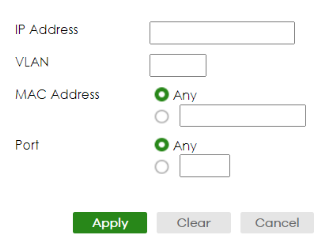
The following table describes the labels in this screen.
label | description |
|---|---|
IP Address | Enter the IP address assigned to the MAC address in the binding. |
VLAN | Enter the source VLAN ID in the binding. |
MAC Address | Enter the source MAC address in the binding. If this binding applies to all MAC addresses, select Any. |
Port | Specify the ports in the binding. If this binding has one port, select the first radio button and enter the port number in the field to the right. If this binding applies to all ports, select Any. |
Apply | Click Apply to save your changes to the Switch’s run-time memory. The Switch loses these changes if it is turned off or loses power, so use the Save link on the top navigation panel to save your changes to the non-volatile memory when you are done configuring. |
Clear | Click Clear to clear the fields to the factory defaults. |
Cancel | Click Cancel to not save the configuration you make and return to the last screen. |