Policy Rule
Policy Rules Overview
This chapter shows you how to configure policy rules.
A classifier distinguishes traffic into flows based on the configured criteria (refer to Classifier for more information). A policy rule ensures that a traffic flow gets the requested treatment in the network.
What You Can Do
Use the Policy Rule screen (Policy Rules) to enable the policy and display the active classifiers you configure in the Classifier screen.
DiffServ
DiffServ (Differentiated Services) is a class of service (CoS) model that marks packets so that they receive specific per-hop treatment at DiffServ-compliant network devices along the route based on the application types and traffic flow. Packets are marked with DiffServ Code Points (DSCPs) indicating the level of service desired. This allows the intermediary DiffServ-compliant network devices to handle the packets differently depending on the code points without the need to negotiate paths or remember state information for every flow. In addition, applications do not have to request a particular service or give advanced notice of where the traffic is going.
DSCP and Per-Hop Behavior
DiffServ defines a new DS (Differentiated Services) field to replace the Type of Service (TOS) field in the IP header. The DS field contains a 2-bit unused field and a 6-bit DSCP field which can define up to 64 service levels. The following figure illustrates the DS field.
DSCP is backward compatible with the three precedence bits in the ToS octet so that non-DiffServ compliant, ToS-enabled network device will not conflict with the DSCP mapping.
DSCP (6 bits) | Unused (2 bits) |
The DSCP value determines the forwarding behavior, the PHB (Per-Hop Behavior), that each packet gets across the DiffServ network. Based on the marking rule, different kinds of traffic can be marked for different kinds of forwarding. Resources can then be allocated according to the DSCP values and the configured policies.
Policy Rules
Click SECURITY > ACL > Policy Rule in the navigation panel to display the screen as shown.
SECURITY > ACL > Policy Rule > Policy Rule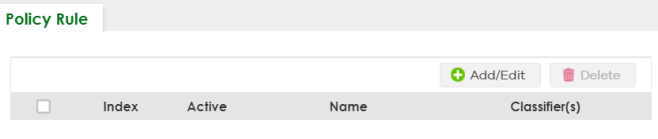
The following table describes the labels in this screen.
label | Description |
|---|---|
Index | This field displays the policy index number. |
Active | This field displays whether policy is activated or not. |
Name | This field displays the name you have assigned to this policy. |
Classifier(s) | This field displays the names of the classifier to which this policy applies. |
Select an entry’s checkbox to select a specific entry. Otherwise, select the checkbox in the table heading row to select all entries. | |
Add/Edit | Click Add/Edit to add a new entry or edit a selected one. |
Delete | Click Delete to remove the selected entries. |
Add/Edit a Policy Rule
You must first configure a classifier in the SECURITY > ACL > Classifier > Classifier Setup screen.
Click Add/Edit, or select an entry and click Add/Edit in the SECURITY > ACL > Policy Rule > Policy Rule screen to display this screen.
SECURITY > ACL > Policy Rule > Policy Rule > Policy Rule > Add/Edit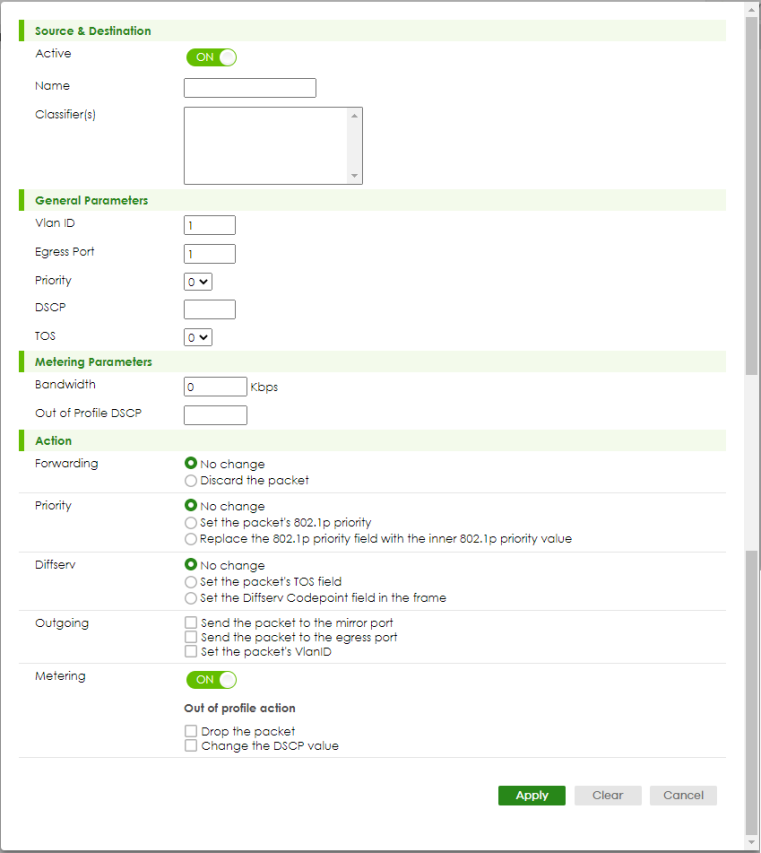
The following table describes the labels in this screen.
label | Description |
|---|---|
Source & Destination | |
Active | Enable the switch button to enable the policy. |
Name | Enter a descriptive name for identification purposes. You can enter up to 32 printable ASCII characters except [ ? ], [ | ], [ ' ], [ " ], or [ , ]. |
Classifier(s) | This field displays the active classifiers you configure in the SECURITY > ACL > Classifier > Classifier Setup screen. Select the classifiers to which this policy rule applies. To select more than one classifier, press [SHIFT] and select the choices at the same time. |
General Parameters Set the fields below for this policy. You only have to set the fields that is related to the actions you configure in the Action field. | |
Vlan ID | Specify a VLAN ID. |
Egress Port | Enter the number of an outgoing port. |
Priority | Specify a priority level. |
DSCP | Specify a DSCP (DiffServ Code Point) number between 0 and 63. |
TOS | Specify the Type Of Service (TOS) priority level. |
Metering Parameters You can configure the desired bandwidth available to a traffic flow. Traffic that exceeds the maximum bandwidth allocated (in cases where the network is congested) is called out-of-profile traffic. | |
Bandwidth | Specify the bandwidth in kilobit per second (Kbps). Enter a number between 1 and 1000000. |
Out of Profile DSCP | Specify a new DSCP number (between 0 and 63) if you want to replace or remark the DSCP number for out-of-profile traffic. |
Action Specify the actions the Switch takes on the associated classified traffic flow.  You can specify only one action (option) for each category (Forwarding, Priority, Queue, Outgoing) in a policy rule.The Switch only applies one policy rule for each traffic flow. You can specify only one action (option) for each category (Forwarding, Priority, Queue, Outgoing) in a policy rule.The Switch only applies one policy rule for each traffic flow.Say you have a traffic flow that matches several classifiers, and you specify a different policy rule for each. The Switch only classifies the traffic flow to the classifier with the highest Match Order. The Switch then applies the policy rule with which the classifier is associated. You can set the classifier Match Order rule (manual or auto) in the ACL > Classfier > Classifier Global settings screen (see Classifier Global Setting for more information). Let’s say you set two classifiers (Class 1 and Class 2) and both identify all traffic from MAC address 11:22:33:44:55:66 on port 3. If Policy 1 applies to Class 1 and the action is to drop the packets, Policy 2 applies to Class 2 and the action is to forward the packets to the egress port, the Switch will forward the packets. If Policy 1 applies to Class 1 and the action is to drop the packets, Policy 2 applies to Class 2 and the action is to enable bandwidth limitation, the Switch will discard the packets immediately. If Policy 1 applies to Class 1 and the action is to forward the packets to the egress port, Policy 2 applies to Class 2 and the action is to enable bandwidth limitation, the Switch will forward the packets. | |
Forwarding | Select No change to forward the packets. Select Discard the packet to drop the packets. |
Priority | Select No change to keep the priority setting of the frames. Select Set the packet’s 802.1p priority to replace the packet’s 802.1p priority field with the value you set in the Priority field and put the packets in the designated queue. Select Replace the 802.1p priority field with the inner 802.1p priority value to replace the packet’s 802.1p priority field with the existing customer priority level carried in the frames and put the packets in the designated queue. |
Diffserv | Select No change to keep the TOS and/or DSCP fields in the packets. Select Set the packet’s TOS field to set the TOS field with the value you configure in the TOS field. Select Set the Diffserv Codepoint field in the frame to set the DSCP field with the value you configure in the DSCP field. |
Outgoing | Select Send the packet to the mirror port to send the packet to the mirror port. Select Send the packet to the egress port to send the packet to the egress port. Select Set the packet's VLAN ID to set the packet’s VLAN ID. |
Metering | Enable the switch button to activate bandwidth limitation on the traffic flows then set the actions to be taken on out-of-profile packets. |
Out of profile action | Select the actions to be performed for out-of-profile traffic. Select Drop the packet to discard the out-of-profile traffic. Select Change the DSCP value to replace the DSCP field with the value specified in the Out of profile DSCP field. |
Apply | Click Apply to save your changes to the Switch’s run-time memory. The Switch loses these changes if it is turned off or loses power, so use the Save link on the top navigation panel to save your changes to the non-volatile memory when you are done configuring. |
Clear | Click Clear to clear the fields to the factory defaults. |
Cancel | Click Cancel to not save the configuration you make and return to the last screen. |
Policy Example
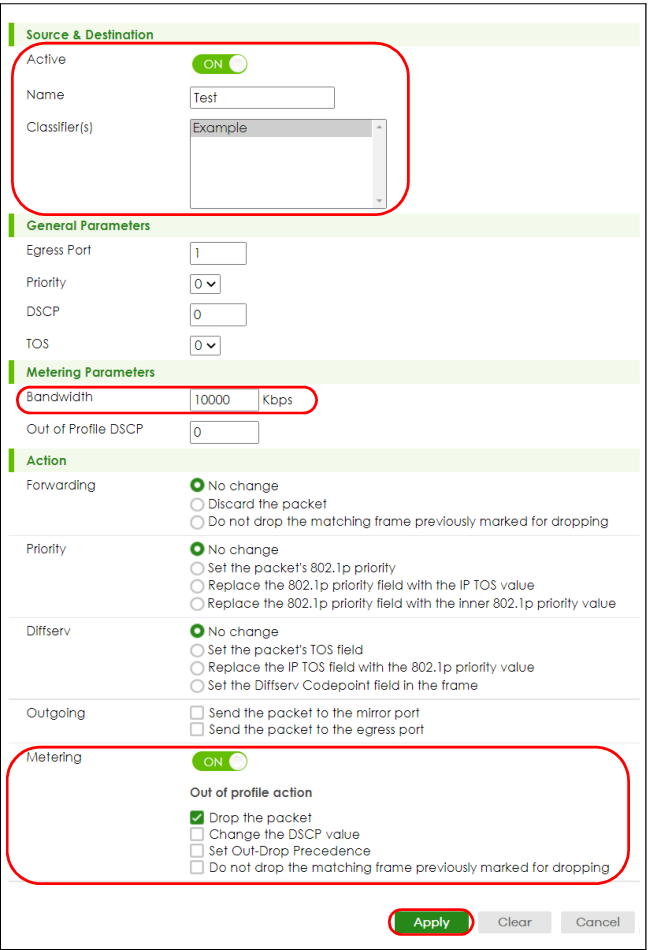
The figure below shows an example SECURITY > ACL > Policy Rule > Policy Rule screen where you configure a policy to limit bandwidth and discard out-of-profile traffic on a traffic flow classified using the Example classifier (refer to Classifier Example).
Policy Example