Nebula
Nebula Overview
You can manage the Zyxel Device through the Nebula Control Center (NCC), see Nebula Management for more information.
Nebula
Use this screen to:
• Enable Nebula Discovery to have the Zyxel Device to try to connect to the NCC.
• Configure the proxy server settings if the Zyxel Device is behind a proxy server.
To access this screen, click Network Setting > Nebula.
Network Setting > Nebula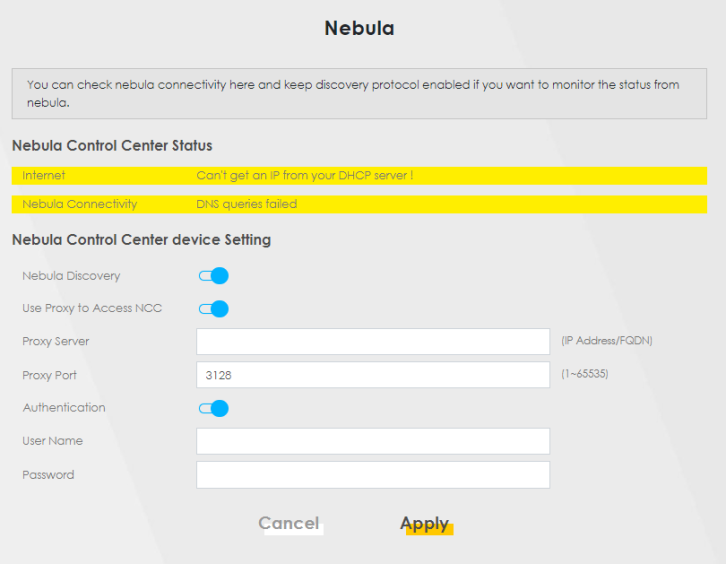
If the Zyxel Device is connected and registered with the Nebula Control Center, the screen appears as below.
Network Setting > Nebula (with registration in the Nebula Control Center)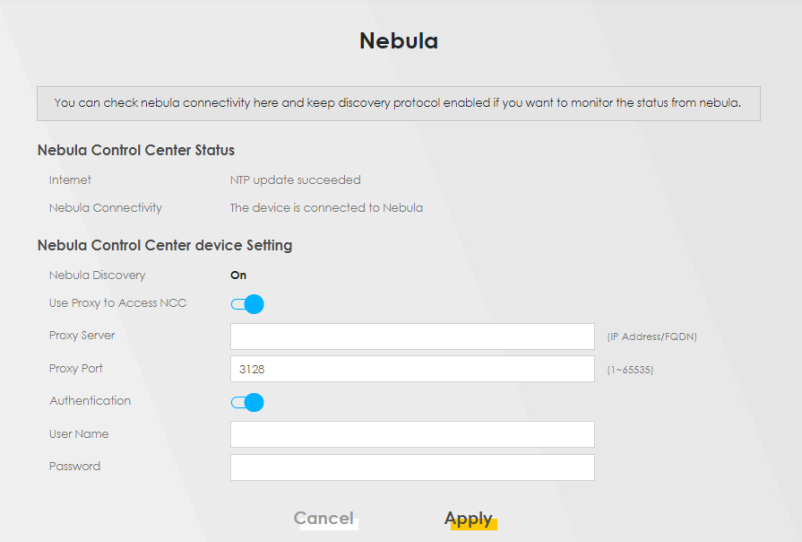
Each field is described in the following table.
LABEL | DESCRIPTION |
|---|---|
Nebula Discovery | Slide the switch to the right to enable Nebula Discovery to have the Zyxel Device try to connect to the NCC. Once the Zyxel Device is connected to and has registered in the NCC, it’ll go into the Nebula cloud management mode. If Nebula Discovery is disabled, the Zyxel Device will not discover the NCC and remain in standalone operation. This is not configurable and will only display ON when your Zyxel Device is being managed by NCC. See Network Setting > Nebula (with registration in the Nebula Control Center). |
Use Proxy to Access to NCC | If the Zyxel Device is behind a proxy server, slide the switch to the right to enable this feature. Configure the proxy server settings so the Zyxel Device can access the NCC through the proxy server. |
Proxy Server | Enter the IP address of the proxy server. |
Proxy Port | Enter the service port number used by the proxy server. |
Authentication | Enable this if the proxy server requires authentication before it grants access to the NCC. |
User Name | Enter you proxy user name. |
Password | Enter your proxy password. |
Apply | Click Apply to save your changes back to the Zyxel Device. |
Cancel | Click Cancel to set the settings in this screen back to default. |